

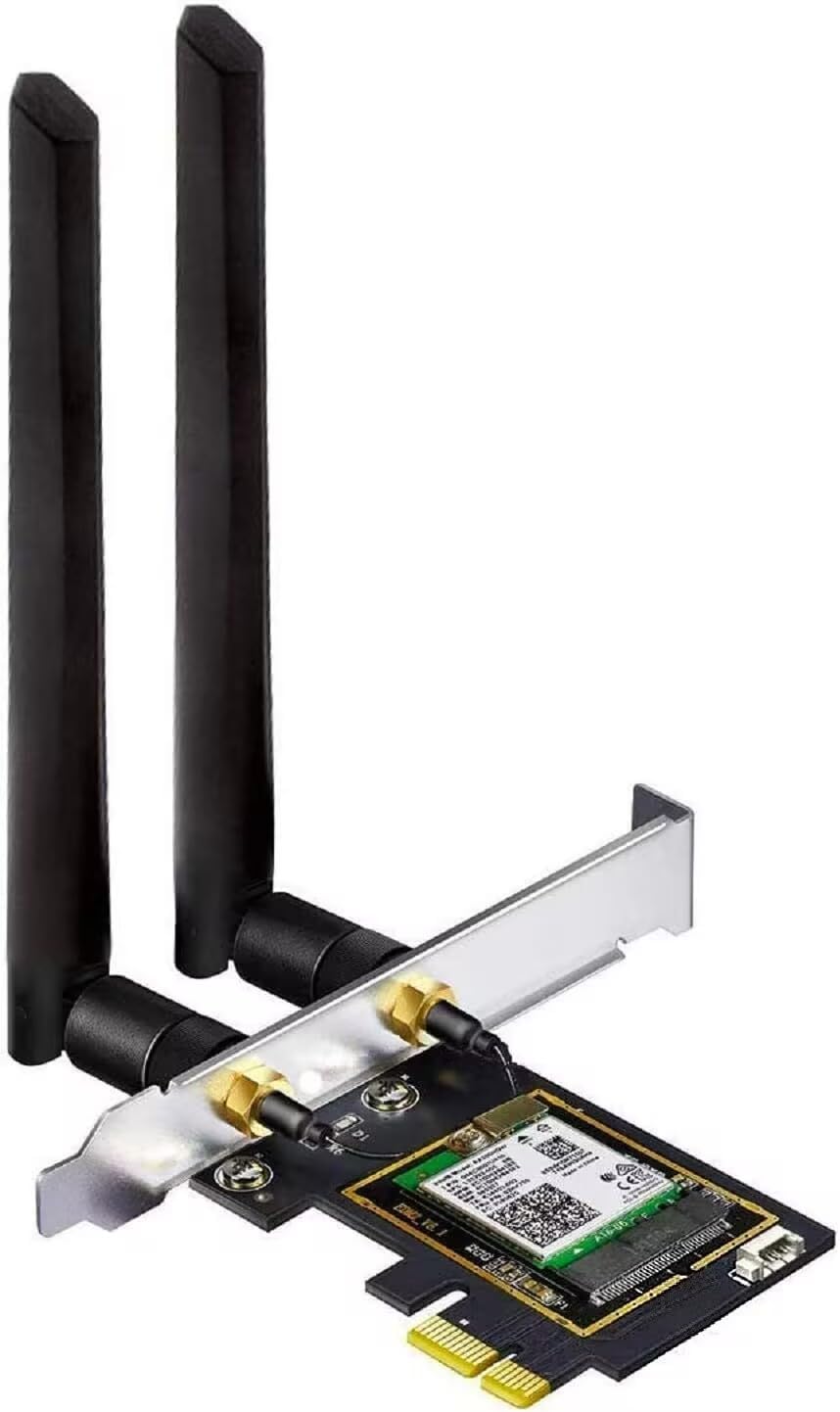
OKN WiFi 6E AX5400 PCIe WiFi Card for Desktop PC (Intel AX210) Bluetooth 5.3, WPA3, 802.11AXE Tri Band Wireless Adapter with MU-MIMO, OFDMA, Ultra-Low Latency, Supports Windows 11, 10 (64bit)
$28.99
Price: $28.99
(as of Feb 08, 2026 06:20:13 UTC – Details)
Product description

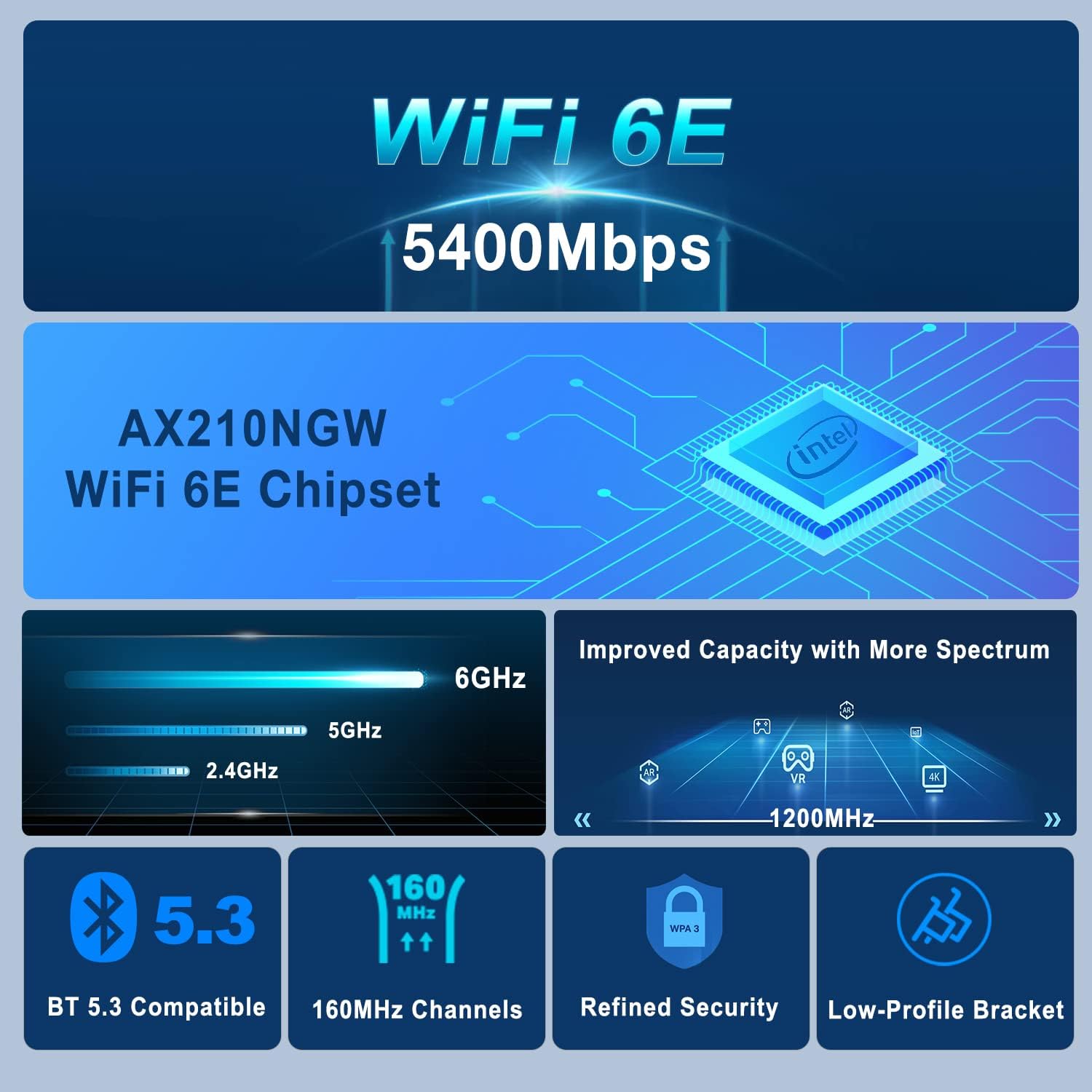
11AX WiFi Card Better Coverage | 2.4Gbps Faster Speed | Bluetooth 5.3 | 802.11ax Tri band 2×2 160MHz | Extended Battery Life

WiFi 6E PCIe Card | 1024QAM | OFDMA | MU-MIMO | 5dBi High Gain Antennas
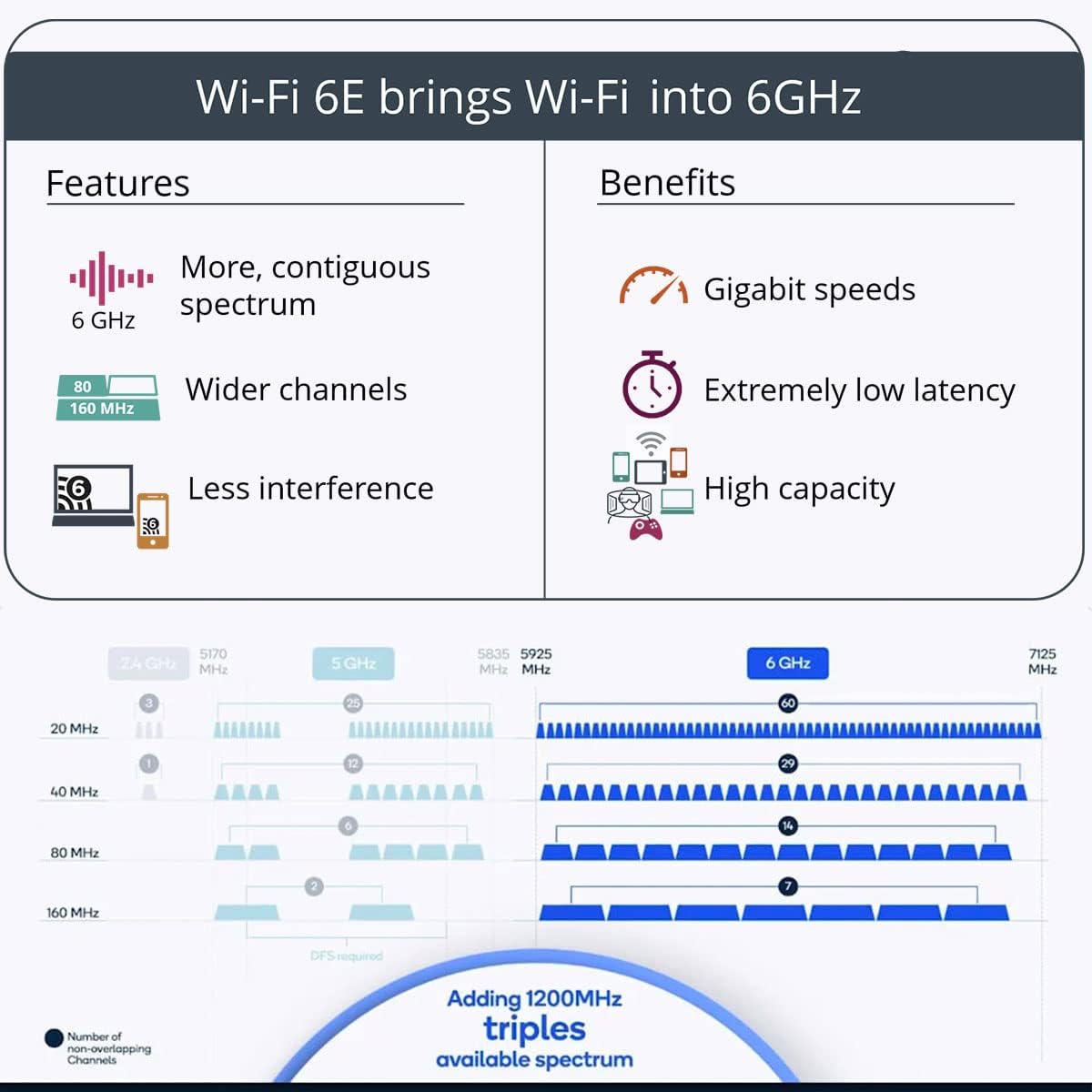
WiFi 6E Makes a Difference: WiFi 6E offers up to 1,200 MHz of additional spectrum for 6 GHz WiFi160MHz Channels: WiFi 6E allows for 7 additional 160 MHz channels.OFDMA: More Speed and Greater Stability 4x Longer OFDM Symbol1024-QAM: Pack More Data with 1024-QAM 25% faster than 256-QAMCompatible: Beyond the Boundaries of WiFi 6
Tri Band 11AX WiFi Card For Desktop PC

WiFi 6E offers up to 1,200 MHz of additional spectrum for 6GHz WiFi
PCIe WiFi card with three bands WiFi offer stronger anti-interference ability, more stable wireless network signal and faster transmission speed.
*Please note that to utilize 6GHz band, the user must have Windows 11 or upgrade to Windows 10 Dev version
Ultra-Responsive Gaming with Lower Latency Coming with this pcie wifi adapter

Wireless connection brings more convenience and simplicity
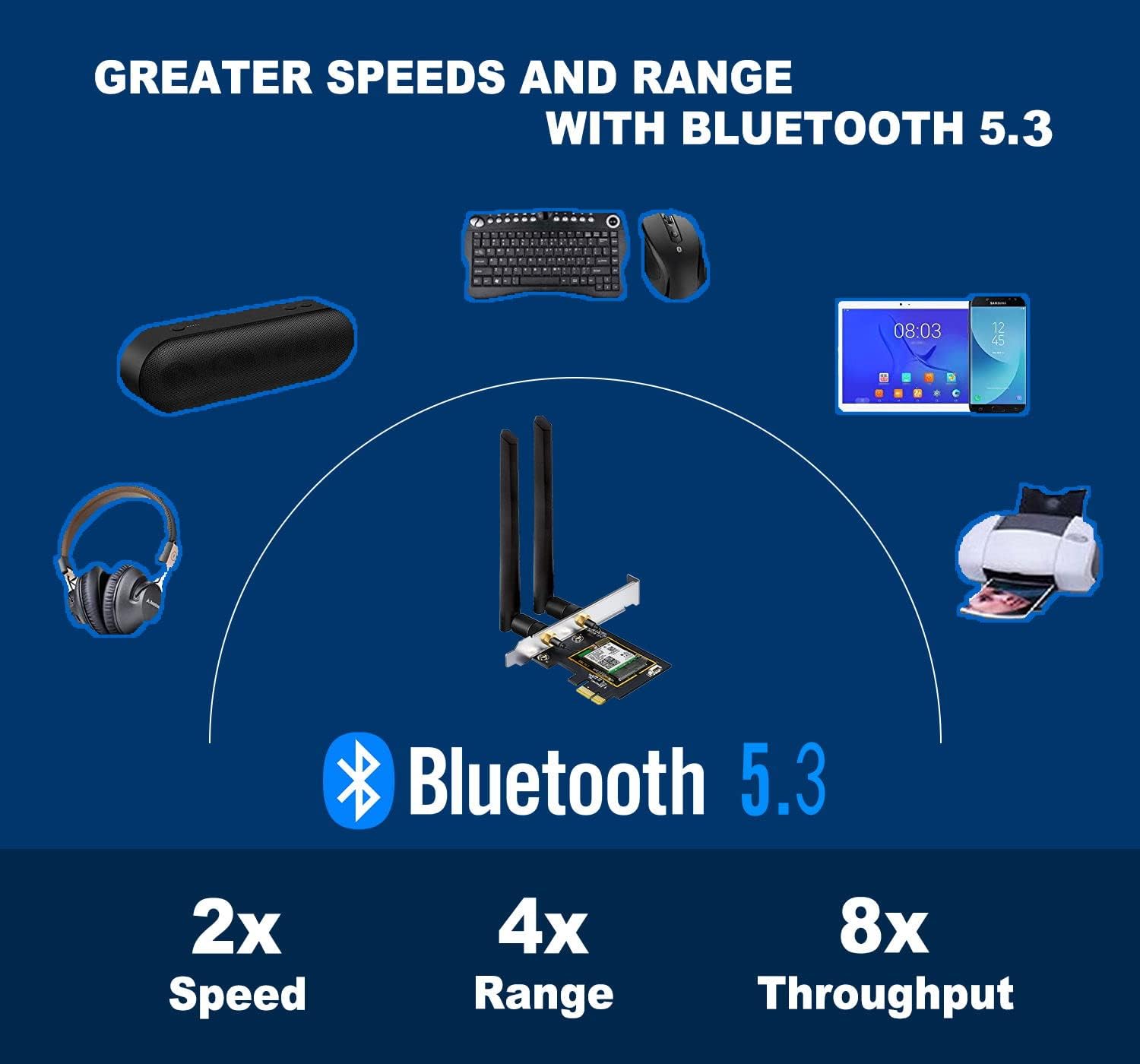
BT 5.3 is compatible with bt 5.2,4.2, 4.1, 4.0…Compared with bt 4.2, the power consumption is lower, which effectively improves the battery life of bt devicesHigher throughput, easy to provide high quality sound, enjoy lossless sound qualityLow latency, support for the latest VR devices, perfect gaming experience4x range over BT4.2 with the same power2X transmit speed for faster transmissions thereby reducing the overall powerAdds new enhanced data broadcasting, seamless services. Simpler pairing for BT devices

Higher Speed
The New-Gen Intel Wi-Fi 6E AX210 reduced latency and improved reliability unlocks your Wi-Fi 6E router’s full potential

Compatibility
Support Windows10/11 64-bit
*Driver CD comes with the package, while if a CD ROM is not convenient for you, you can get the driver download link from the manual or the Intel official website by searching “AX210”. It is recommended to download the driver first and then install the network card.

Packing List 1x OKN AX210 WiFi 6E PCI Express Card2x High Gain Antenna1x Low Profile Bracket1x BT USB Cable1x Resource CD, Quick Installation Guide

Anti-oxidant Coating for PCIE
The PCIe gold finger is protected by an anti-oxidation coating to prevent damage to the gold plating during transportation and storage, resulting in poor contact.

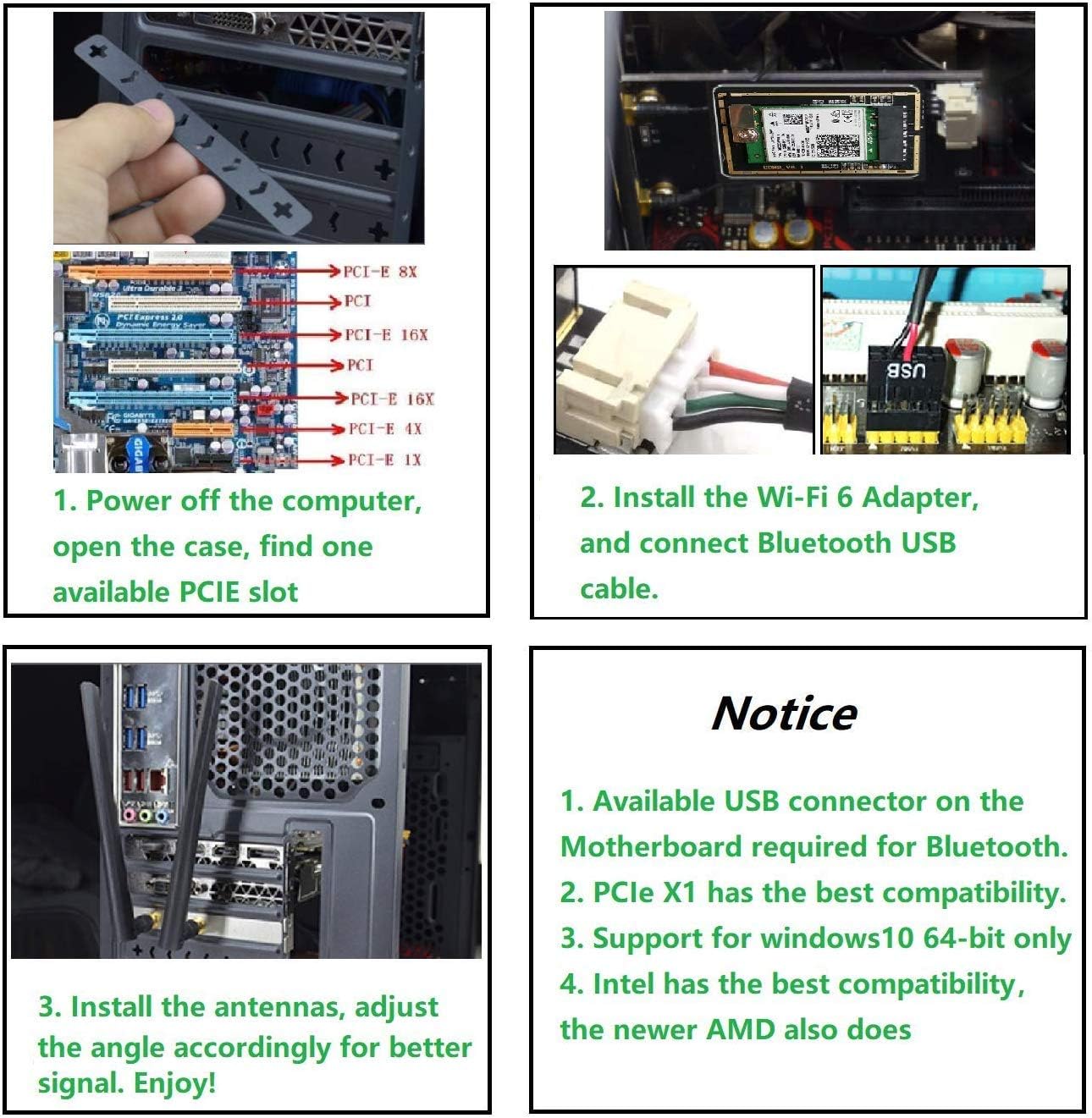
Quick Installation 1st. Turn off your computer and remove the case panel.2nd. Locate an available PCIe slot and carefully insert the adapter.3rd. Connect the antenna to the adapter.4th. Replace the case panel, plug in the power cable and turn on your computer.
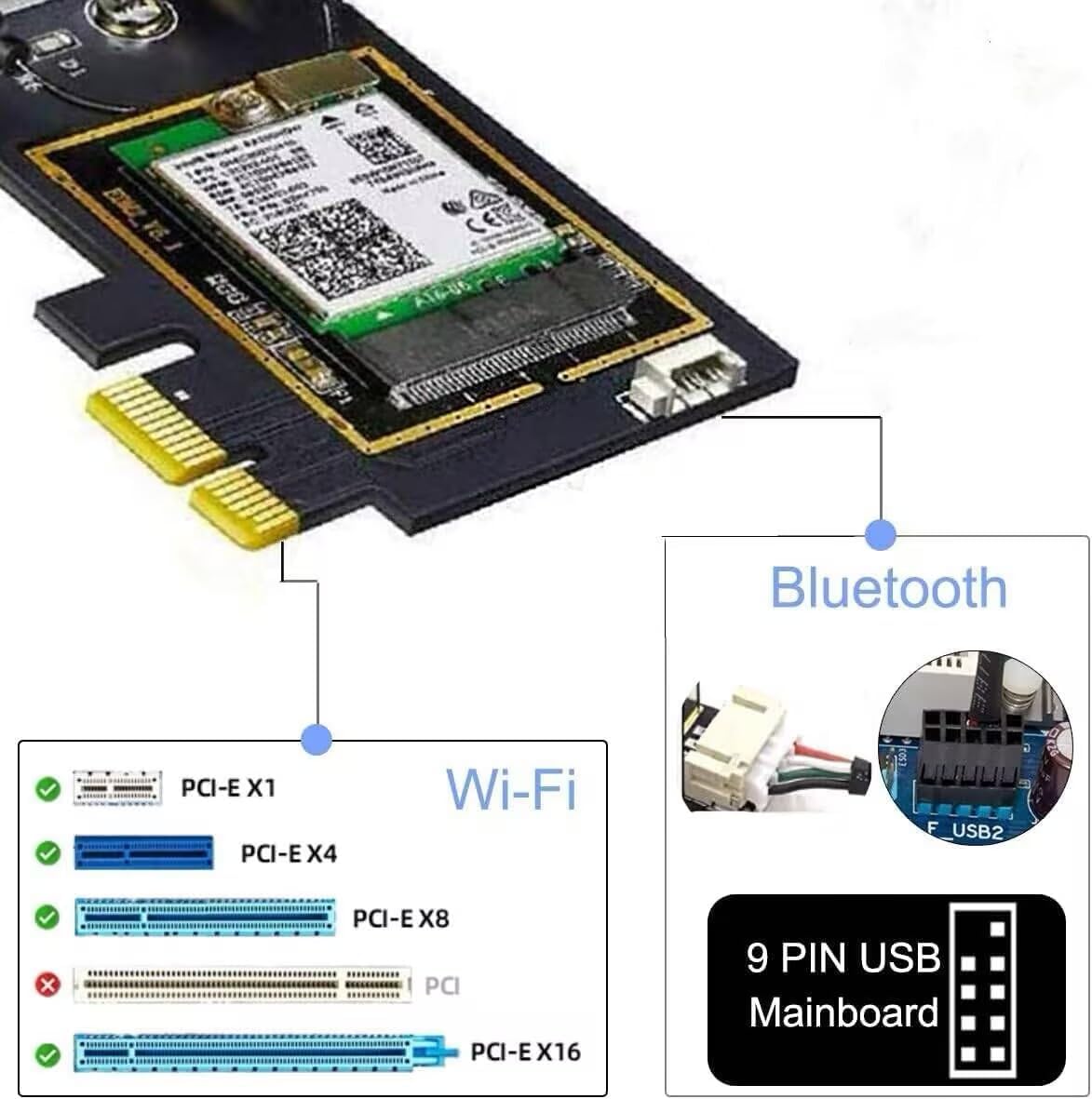
Please connect the USB 9-pin cable(Black) that comes with the package to the USB 9-pin interface on the Motherboard after the installation of step b above,the White end connects to the pcie adapter socket. Then install the Bluetooth driver.

The Bluetooth works fine, but there is no wifi? 1. First check whether the device wifi is recognized by the computer in the device manager. If the network controller with a yellow exclamation mark appears, install the wifi driver. If the driver is installed, the yellow warning is still displayed. Please right-click, click Update, and select the driver file path to manually update. 2. Check whether there is an M.2 hard disk on the motherboard, which may cause a hardware function conflict. M.2 hardware in parallel channel needs to be unplugged.3. Check if the antennas connection is fastened.4. Please turn off the built-in wifi function when using on a desktop PC.5. For some AMD motherboard PC, you may need to set the PCIe speed to Gen3 (Auto, Gen 1, Gen 2 and Gen 3).6. You can try different things by swapping out different pcie slots (pcie×4,×16 is available).
Please Note: The network environment, router, barriers, laptop and PC ‘s internal memory…the interference of many factors can affect the wifi speed.
Customer Reviews
4.5 out of 5 stars 785
4.5 out of 5 stars 1,282
4.6 out of 5 stars 1,009
4.5 out of 5 stars 1,551
Price
$23.98$23.98 $23.98$23.98 $22.93$22.93 $24.64$24.64
Interface
PCIe M.2 NGFF M.2 NGFF M.2 NGFF
Wireless
11AX WiFi 6E 11AX WiFi 6E 11AX WiFi 6E 11AX WiFi 6E
Max Speed
2400Mbps @ 6G + 2400Mbps @ 5G + 574Mbps @ 2.4G 2400Mbps @ 6G + 2400Mbps @ 5G + 574Mbps @ 2.4G 2400Mbps @ 6G + 2400Mbps @ 5G + 574Mbps @ 2.4G 2400Mbps @ 6G + 2400Mbps @ 5G + 574Mbps @ 2.4G
High Gain Antenna
5dBi 5dBi with 30cm Extension Cable Not attached Not attached
Dual Band
6GHz / 5GHz / 2.4GHz 6GHz / 5GHz / 2.4GHz 6GHz / 5GHz / 2.4GHz 6GHz / 5GHz / 2.4GHz
Online Gaming
✓
✓
✓
✓
8K HD Video Streaming
✓
✓
✓
✓
MU-MIMO
Up & Down Up & Down Up & Down Up & Down
Supported operating systems
Windows 10/11 64-bit Windows 10/11 64-bit Windows 10/11 64-bit Windows 10/11 64-bit
【Ultrafast WiFi 6 & WiFi 6E Support 6GHz】The PCIE WiFi 6E Card Built-in AX210 chipset provides the latest 802.11ax standard technology. Target Wake Time, delivers from 80MHz to 160MHz higher peak data rates,boosts your overall speeds up to 5400 Mbps(574Mbps @2.4GHz + 2400Mbps @5GHz +2400Mbps @6GHz) and up to 4X capacity improvement in dense or congested environments comparing to 802.11ac. Heartily enjoy 8K movies, large file transfer and smart home devices with fewer dropped connections.
【The ALL-New 6GHz Band】The ALL-New 6GHz solves WiFi spectrum shortage by providing contiguous spectrum blocks, including 7×160MHz channels, 14×80MHz,which refuses signal congestion in high demand environments. Wider channel and faster data throughput fully satisfys high-bandwidth applications such as unified communications, cloud computing, augmented and virtual reality, and telepresence as well as lower latency connectivity. More choices to unlock your WiFi6E router’s full potential.
【The New-Gen Bluetooth 5.3】BT 5.3 is coming with AX210. Based on Bluetooth 5.2( 4x Range , 2x Transmit Speed over BT 4.2), it has larger capacity, higher speed, extremely low latency and stronger battery life.The powerful energy and continuous workflow can be an ideal home choice with game controllers,BT TWS earplugs, earphones, keyboards,etc., which can bring many devices connection and more demands convenience for your Desktop PC ultimate setup.
【OFDMA & MU-MIMO For Minimizing Lag】 The WiFi 6E Adapter with OFDMA,MU-MIMO support greater network flexibility, faster downloads, sharing and backup, as well as ultra-low latency, lower power consumption. 160 MHz large bandwidth double throughput greatly improves signal gain when multiple users are served at the same time. Minimized Lag for your PC on busy network for your ultra-responsive real-time gaming or an immersive VR experience.
【Broader Connection】Reduced dead zones for the best reception—Two 5dBi external multi-directional antennas for optimal signal reception focus on more reliable signal strength, greatly increase network coverage for a smoother online experience further away.
【Compatibility And Install Driver Tips:】Support Windows 10/11 64-bit OS. Compatible with all PCIe standard. Standard and Low-Profile Brackets to adapt to your different computer sizes. Download the driver from the intel web by searching “AX210”. If you have any questions, please feel free to contact us via amazon message for technical support.【Please note】To utilize 6GHz Wi-Fi, the user might use Windows 11 or upgrade to Windows 10 Dev version.
9 reviews for OKN WiFi 6E AX5400 PCIe WiFi Card for Desktop PC (Intel AX210) Bluetooth 5.3, WPA3, 802.11AXE Tri Band Wireless Adapter with MU-MIMO, OFDMA, Ultra-Low Latency, Supports Windows 11, 10 (64bit)


Related products


Silkland 8K HDMI Extension Cable Short 1.6FT/0.5M HDMI Extender 2.1, 8K@60hz 4K@120hz Hdmi Male to Female Adapter, Ultra High Speed 48Gbps Extensor Cord Compatible with Fire Stick Roku TV Blu-Ray PS5


TP-Link Tri-Band BE9300 WiFi 7 Router (Archer BE550) – 6-Stream, Full 2.5G Ports w/ 6 Internal Antennas, Up to 2,000 Sq Ft, Add Easy-Mesh Device for Extended Coverage, VPN and Free Expert Support



Winter –
Great speed and range.
I got this to replace my USB Bluetooth adapter, and have been very happy with it. With my old Bluetooth I could barely go to the other side of my room, now I can walk anywhere in the house and keep connectivity.I was also pleasantly surprised with the Wi-Fi. It’s substantially quicker than my phone or laptop.It was easy enough for me to put in and get working, and I’ve had no issues since I got it.
Steve –
Good WiFi card
Nice WiFi card. Easy to install and get working. Solid high speed connections to my router.
Kindle Customer –
Works great, easy to install
Quick easy install. Connection to WiFi is good and stable about 40 feet from router through walls of an old house. No driver install needed
Troy Jones (St. Johns, FL) –
Works great but must be in PCIE-1 slot in motherboard
I had a *very hard* time getting this card to work correctly in my PC, but with help from the manufacturer (UFON), I was eventually able to get it configured and operating normally. My symptoms were that the device would be recognized but not start up in Windows 10, especially after any configuration changes. I could sometimes get it to start normally and on a few instances it actually connected to my network, but would disconnect after 5-10 seconds.The sales support staff at UFON responded within a day to my email request for assistance. They key piece of information they provided was that this adapter needs to be in PCIE-1 slot for compatibility AND since it is an INTEL-based card, it may have compatibility issues with AMD-based systems. Fortunately, I have an ASROCK motherboard with an Intel i7 processor. After switching the adapter to the proper PCI slot, configuration was simple. INTEL has good documentation for their driver software which also helps.The card is now connecting on 802.11AC with no issues and I am getting a sold 585 Mbps connection which sometimes ramps up to 650 or even 866 Mbps. This is, of course, highly dependent on the distance to my Xfinity router. YMMV. The Bluetooth network features are a bonus, too!If there had been better instructions or compatibility information, I would have given a 5-star rating, but since I was hours away from returning it back to Amazon, I dropped it down one notch. Very glad to be off of my old 2.4 GHz connection. Life is good!
Christopher coil –
Great product
Easy to plug in, and simple worked form there! The download of programming was pretty quick to get it up and running!
Adrian –
Exactly what it needs to do
Very easy to install and works like a charm.My pc didn’t have Bluetooth or WiFi but now it does 🙂
César Torres –
Good product
has good quiality and technology like wifi 6e and Bluetooth 5.3 and no worries, it’s like universal, works on every pc with PCI
Thomas Stephens –
Couldn’t get Bluetooth to Work.
I bought this card so that I could stop using a cheap bluetooth 4.0 dongle plugged into my from panel USB port. I recently picked up a VR headset and controllers and thought it would be nice to add Bluetooth 5.0 to my system for when future VR controllers support the standard.I installed this card as instructed, downloaded and installed drivers from Intel’s website as instructed. The Wifi worked right away, but the Bluetooth wouldn’t work. The bluetooth option in settings in Windows 10 isn’t even there. There is no Bluetooth device showing up in the control panel either. The driver installed fine, I tried repairing it just in case. I also checked all Bluetooth services and set them to run automatically. I triple checked the card side cable to make sure it was seated properly(it’s either a JST or smaller form Molex, maybe Pico) and it seemed fine. Inspected the solder points on the card and the through hole pins all seemed to be soldered correctly. The cables looked like they were terminated well and they tested fine for continuity with my multimeter. I tried both of my USB 3.0 headers and my other device(RGB lights on my CPU cooler) worked on any of the headers but this card did not work on either.I tried searching support forums but it seems that very few people talk about bluetooth functionality and they just talk about the wifi capabilities. Since this item has free Amazon support I decided to give it a try and the Amazon rep went over all of the troubleshooting steps with me on the phone. We tried everything I had already tried, and he thought that it was either a defective card or the cable.I’m unsure if this is an issue with the PCIe card itself, or the M.2 Intel AX200 chipset. I doubted it was the cable but thought I’d give it a try so I tried reaching out to the manufacturer via their email address that they provided in packaging but they weren’t much help. They just stated that this card may not be compatible with AMD systems, which while that may be the case, it’s doubtful since there are standards for a reason, and this card should comply with those standards. My Ryzen work laptop from Lenovo has an Intel Wifi chip and it works fine. They wouldn’t even send me a replacement USB cable to test at first and only offered after I informed them that the Amazon support guy had suggested it and that I was going to leave a negative review. Regardless, I decided to return the card and buy a more reputable brand with a slightly older standard with Wireless AC and Bluetooth 4.2 instead.Anyway, I cannot recommend this card unless Bluetooth compatibility issues get sorted out. If you’re just using it for Wifi then it may work for you, but if you’re looking to add Bluetooth you may want to look elsewhere. Here’s my system specs for anyone that’s curious and/or has similar hardware:AMD Ryzen 1700 @ 3.9ghzVega 64 8GBASUS Plime B350M-A32GB(2×16) Corsair Dominator DDR4 3000 CL15(running at 2933 CL14)A-Data XPG 1TB NVMESeasonic Gold 630W PSULG 34″ Ultrawide 144hz Freesync MonitorSamsung HMD Odyssey Plus WMR Headset
Robert –
The bluetooth works but the wifi drivers don’t work in Australia. Won’t even connect to wifi 6 router.