






Elgato 4K S – External Capture Card for PS5, Xbox Series X/S, Switch 2, PC, Mac, iPad | 4K60, 1440p120, or 1080p240 Passthrough and Capture, HDR10, VRR, USB-C, Near-Zero Latency
$159.99
Price: $99.99 - $159.99
(as of Feb 08, 2026 15:49:15 UTC – Details)
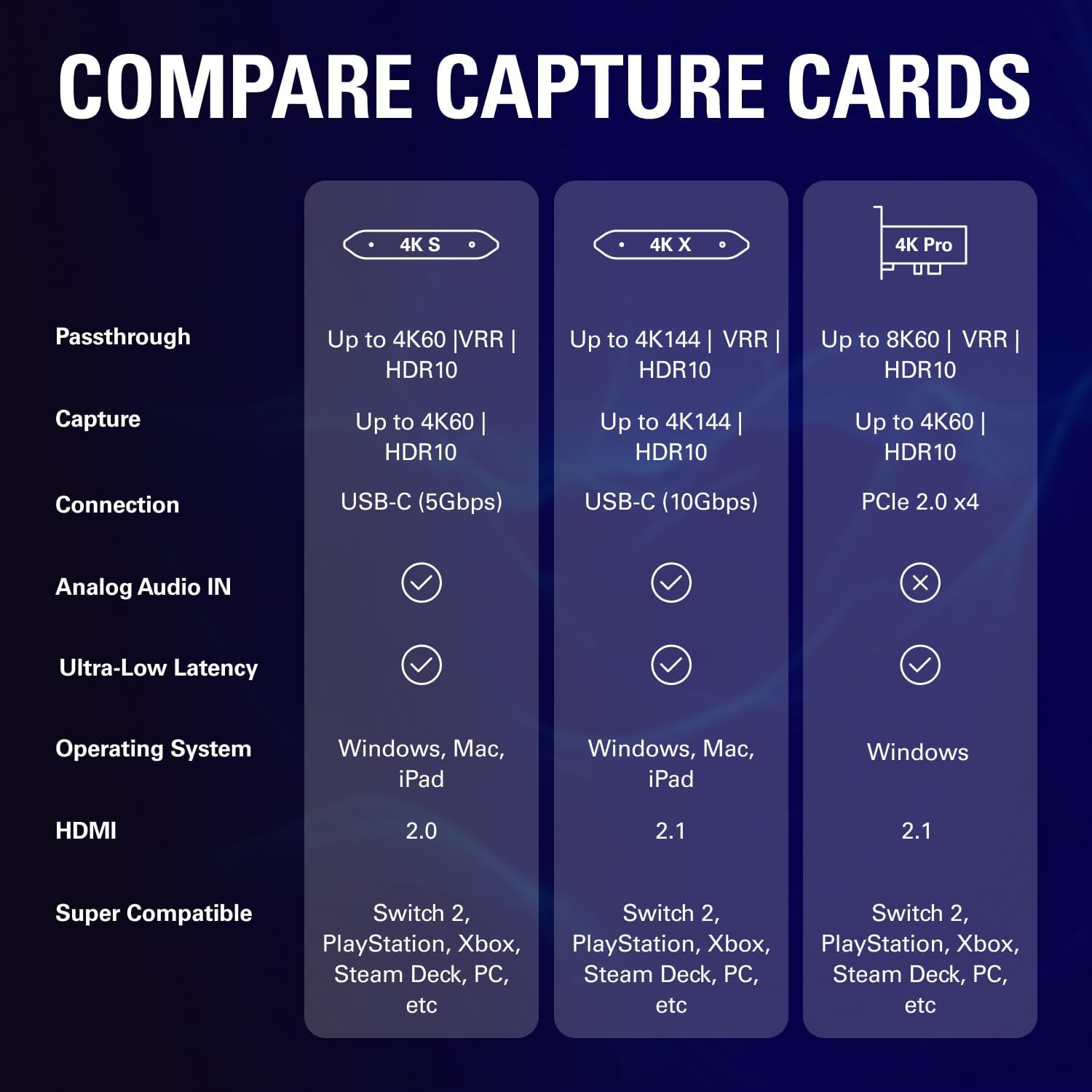
Elgato Game Capture 4K S lets you play and capture in 4K60, 1440p120, or 1080p240 with near-zero latency. Enjoy VRR passthrough, HDR10 capture (Windows only), and plug-and-play support across Mac and iPad too—a streamlined solution for high-performance capture on all your gaming systems. Technical Specifications: Input: HDMI 2.0 (unencrypted), 3.5 mm analog audio in Output: HDMI 2.0 (lag-free passthrough) Passthrough Resolutions: Up to 2160p60, 1440p120, 1080p240 Capture Resolutions: 2160p60, 1440p60, 1080p120, 1080p60, 720p60, 567p, 480p HDR10 Passthrough: Up to 2160p60 HDR10 Capture: Up to 1080p60 (Windows only) VRR Support: Yes Dimensions: 112 x 72 x 18 mm / 4.4 x 2.8 x 0.7 in Weight: 90 g / 3.2 oz System Requirements: OS: Windows 11 (64-bit), macOS 13 or later, iPadOS with USB-C CPU: Intel Core i5 (8th gen or later) / AMD Ryzen / Apple M1 or better GPU: NVIDIA GeForce RTX 10xx or equivalent Port: USB 3.0 Type-C Product Dimensions: Size: 17 x 112 x 72 mm (depth x width x height) Weight: 91 g / 0.2 lbs In The Box: Game Capture 4K S, USB C-to-C Cable (150 cm / 59 in.), HDMI 2.0 Cable (150 cm / 59 in.)
4K60 Capture: Record in cinematic quality with crisp detail and vivid colors
HFR Support: Play and capture in 1440p120 or 1080p240
HDR10 Support: Capture brilliant HDR content with tone mapping on Windows
Cross-Platform Compatible: Works with PS5, Xbox Series X/S, Switch 2, and more
Analog Audio In: Capture in-game chat or commentary with 3.5mm input
13 reviews for Elgato 4K S – External Capture Card for PS5, Xbox Series X/S, Switch 2, PC, Mac, iPad | 4K60, 1440p120, or 1080p240 Passthrough and Capture, HDR10, VRR, USB-C, Near-Zero Latency


Related products


Analog CCTV Camera HD 1080P 4-in-1 (TVI/AHD/CVI/CVBS) Security Dome Camera Outdoor, 2.8mm-12mm Manual Focus/Zoom Varifocal Lens, Weatherproof Metal Housing 36 IR-LEDs Day & Night Monitoring (White)


etguuds USB A to USB C Cable 6ft, 2-Pack, 3A Fast Charging Type C Charger Cord for iPhone 17 16 15 Pro Max 16e 17 Air, Samsung Galaxy S25 S24 S23 S22 S21 S20 A17 A16 A56 A55 Flip Fold, Gray


Oliver –
This capture card is a absolute BEAST
⭐ 5.0 out of 5 stars – The Elgato 4K S is an ABSOLUTE BEAST for Streaming and Recording 🔥🎮If you’re serious about content creation or streaming, the Elgato 4K S is the real deal. This thing captures buttery smooth 4K footage with zero lag, zero hassle, and the quality is just insane. My gameplay looks so clean it almost doesn’t feel real — crisp colors, sharp movement, and no dropped frames at all.Setup took literally minutes. Plug it in, install the software, and BOOM — perfect capture instantly. Works flawlessly with my PC and my console, and it handles fast-paced games (Warzone, Fortnite, Apex, whatever) like a champ.What surprised me most is how reliable it is — no overheating, no glitching, no weird issues. Just pure, stable, high-quality recording every single time. If you’re trying to level up your YouTube, TikTok, or Twitch content, this is one of the best upgrades you can make.Elgato knocked it out of the park with this one. Worth every penny.
Suhail –
Great Entry to 4K Capture, but Mind the HDMI 2.0 Limits
The Elgato 4K S is an excellent, easy-to-use capture card, especially if you’re upgrading from a 1080p card or want a simple external setup.Pros (The Good Stuff):Ease of Use: Truly plug-and-play. I was recording within minutes with their 4K Capture Utility software.Portability: The USB-C power and small form factor make it perfect for a compact desk setup or travel.Quality: The 4K60 footage is very clean and sharp, and the HDR support is a nice touch.Cons (What to Consider):Passthrough: While the passthrough is nearly lag-free, it uses HDMI 2.0. This means if you have a high-end 4K monitor capable of 120Hz or higher, you’ll be limited to 4K60 when the card is connected, unless you drop the resolution to 1080p or 1440p to get higher refresh rates. It forces a trade-off.No Dedicated Power: Being bus-powered is usually a plus, but it does mean your PC/laptop needs sufficient USB power.Final Verdict:It’s a solid, reliable, and convenient capture card that delivers great video quality for the price. However, users with top-of-the-line gaming monitors might find the HDMI 2.0 limitations a bit frustrating. If you mostly play at 4K60, this is a perfect 5-star choice. For high-refresh-rate console gamers, it’s a very solid 3.5 to 4-star device because of that one limitation.
Chris –
A 4K Ultra Wide Capture King 👑
A Hugh upgrade from the hd 60x and the right upgrade thanks to the ultra wide support now and 144hz capture on a 3440×1440 is a streamers dream. Fits the agenda for consoles such as the Xbox Series S/X as well as PS5.I own all systems and tested this on them and the results are good. Elgato is like the power company and they have you by the balls and you have to go their route as not another company can provide or compete. Now before you yell at me and say avermedia then hear me out. I am not a paid reviewer and I am elgato to the end all because avermedia failed me with their software and input lag which is not good. This capture card 4k x is long needed and should have been what they tried to do with the HD60X. I stream daily with this thing and I never turn it off and it’s going strong. If you enjoy high quality and fast lag free gameplay then come on and join me and the other happy customers as you won’t regret it
Abram –
It’s perfect for what I need to record gameplay.
Works great just and just needed to find how to get audio which was easy on OBS. Though all works as expected. I needed this my whole life to make things like video gameplay fun. Connectivity is great. Video capture on console is awesome.
Joe –
Pretty good capture card despite Windows 11
Bought this to replace an older HD 60S which was a wonderful workhorse for all my years streaming on console. I wanted something more modern and would hopefully give me no fuss for when I switch to Linux soon.The 4K S works right out of the box, no drivers needed. I love that. Some strange stuff happened when I first plugged it in, I got a weird pink filter on my screen. Unplugging and replugging it back in fixed it. Also, 4K Capture Software refused to install because Microsoft Teams was running. I had no idea it was on my PC in the first place, but Microsoft is especially terrible with Windows 11 and sneaking in things that I wouldn’t want on there. I just removed Teams and since then, it’s good. I’ll update if anything changes.
SLUDJIN –
Does everything I need it to do and more
Surprisingly much better than I was expecting, the passthrough video is a great feature so I can game without losing any frames/quality on my end. Works perfectly with OBS, highly recommend using NDI link for the reduced latency and slight quality increase. Works with Windows 10, and 11. Very little latency, works great with my PS5 pro, audio quality is bar none exactly what I would’ve asked for. Leave it to Elgato to smash the competition, don’t sleep on the cat!
Caitlynn Hamilton –
Just do it. Upgrade your device.
if you’ve been on the fence, here’s your sign. it is worth it. I’ve been using a mirabox cheap ($40) capture care for the last few years and I happened to have some christmas money still and decided it would be worth it to finally upgrade. Jesus christ i’ve been streaming the stone ages!! the graphics are so clear and it works great with my low end set up – I stream from a macbook pro M1 LOL. Thanks Elgato!
Brad tatt –
Latency is extremely good while playing on preview.
If your looking for a device to not have to use the passthrough and just play your console games on your desktop this is it! Set up was straight forward. Downloaded the Studio software from Elgatos website and connected the 4K S. I ran ran the USB-c directly into my motherboard. Connected the Switch 2 dock up with the supplied HDMI Cable. It did not work at first but there was a reddit post about needing to turn off HDR at first to get it to connect and that worked perfectly. Latency is low enough were i cant tell. Outputting to a 1440p 240hz monitor.I used the slo-motion camera on a Iphone to try and calculate the latency i was getting with the switch 2. Actually was getting better than what Elgato Advertises.240FPS Recording at 60FPS Playback (25% speed).First Frame of stick getting moved – 6.64First Frame of Menu Switching – 7.11Difference of .47 (This is at 25% playback speed so at normal speed this would be divided by 4)Actual Latency – 12ms
Victor Gabriel –
Chegou dia 15/01… pelo menos 2 semanas antes do prazo, estou testando mas até o momento tudo certo não apresentou nenhum defeito
Jean-Frédéric –
Cette Elgato 4K X est parfaite pour streamer et enregistrer toutes mes consoles, ultra fluide en 4K/60fps sur PS5 Xbox Switch, zéro latence avec une qualité broadcast pro, compatible absolument tout moderne comme rétro, logiciel simple et hyper efficace, l’outil indispensable pour tout joueur multi-consoles, je recommande à fond ⭐⭐⭐⭐⭐
Nedick Dufrein –
Llegó antes de la fecha y en perfecto estado. Funciona excelente, muy fácil de utilizar, con tu programa de streaming favorito. Lo recomiendo ampliamente, solo debes configurar de la manera más adecuada a tu tipo de PC y el programa que utilices para grabar o streaming; ya que puede mostrar imparidad entre el audio y el video. Excelente precio y no le pide nada a su versión 4K X.
Ramon van Mierlo –
Amazone kiest voor een bedrijf dat je spullen niet levert kwijt raakt etcDus mensen allemaal een klacht indienen op dat tuig
Andrew.R –
I got this primarily to record 1080p input streams from other devices on Mac. It was plug-and-play, HDMI goes into the source, USB-C into the Mac and it shows up.It only worked on the USB-C port nearest the power cable on my Mac M1 laptop, the other 2 USB-C ports didn’t connect. Maybe insufficient power on the other ports.I found OBS software to be the best option for capturing. Elgato Studio and Quicktime are simpler to use but have very few options for configuring and OBS has video filters to adjust color and picture quality.Although I intended to use it for 1080p, I have it set to 4K as it gives a sharper image and it works great at 4K60. I can record 4K60 videos and they are smooth and clear. Connection speed is 5Gbps.The product is compact and lightweight, the supplied cables are high quality and look durable. The device barely gets warm even after using it for hours.One thing to note that I found out later is the 4K X has higher quality recording formats. I assumed the only difference was being able to capture 4K120 due to running at 10Gbps, which I didn’t need but it also allows higher quality recording of the lower resolutions and framerates so if the best picture quality is needed, it may be worth paying the extra for the 4K X.The 4K S suited my needs perfectly, it’s very reasonably priced and works great.