




Logitech K400 Plus Wireless Touch TV Keyboard with Easy Media Control and Built-in Touchpad, HTPC Keyboard for PC-Connected TV, Windows, Android, ChromeOS, Laptop, Tablet – Black
Original price was: $34.99.$29.99Current price is: $29.99.
Price: $34.99 - $29.99
(as of Feb 08, 2026 17:21:05 UTC – Details)
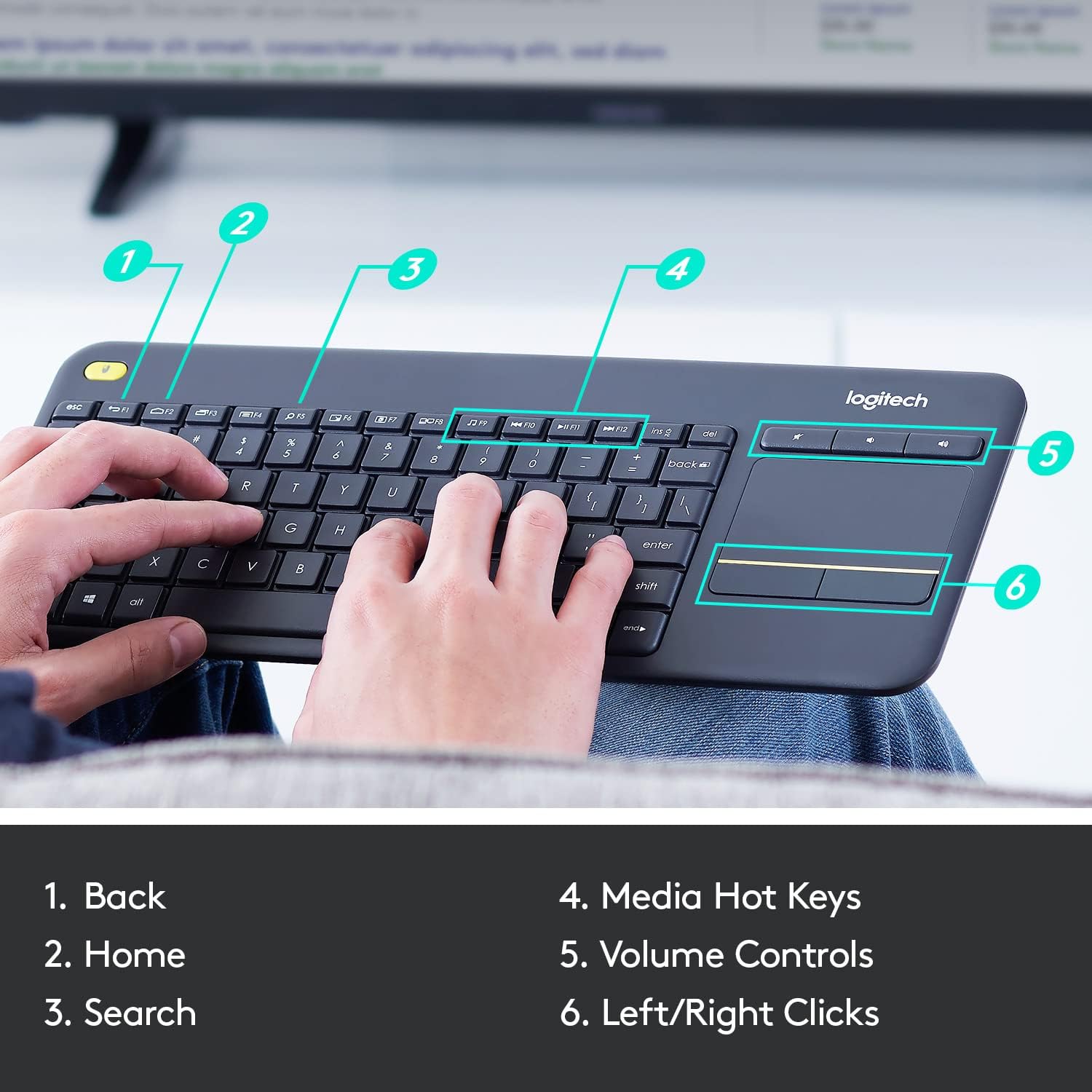
The Logitech Wireless Touch Keyboard K400 Plus lets you experience PC-to-TV entertainment the way you Watch video, browse the web, chat with friends and much more. The all-in-one keyboard with touchpad ends the hassle—and clutter—of multiple devices. And a 10-meter (33-foot) wireless range ensures your fun won’t be interrupted. Comfortable, quiet keys and a large (3.5-inch) touchpad make navigating entertainment effortless. Even setup is a snap thanks to the tiny, plug-and-play Unifying receiver. The 18-month battery life means you might even forget the keyboard needs batteries. 1 Wireless range may vary depending on operating environment and computer setup. Assumes up to two hours typing per day. Actual battery life will vary with use, settings and environmental conditions.
Media-Friendly: The K400 Plus wireless touch TV keyboard gives you integrated, comfortable control of your PC-to-TV entertainment, eliminating the clutter of a separate keyboard and mouse
Plug-and-Play: Simply plug the Unifying receiver into a USB port and the wireless touchpad keyboard is ready to go; adjust controls using the Logitech Options Software to save preferred settings
Power-Packed: Built with laid-back control in mind, this wireless TV keyboard has a reliable and long battery life of up to 18 months (2), including an on/off button to help it go even longer
Wireless Freedom: Designed for seamless comfort and control, this HTPC keyboard boasts a range of up to 33 ft (1) wireless connectivity, with quiet keys and a large touchpad for easy navigation
Broad Compatibility: Designed for use with Windows 7, Windows 8, Windows 10 and later, Android 7 or later, and Chrome OS
Durable and Reliable: The spill-resistant design (4) and long-lasting keys keep you on-track despite any mishaps
Upgrade to Logitech K830 Keyboard: For increased comfort, illuminated keys, USB/Bluetooth connectivity and a rechargeable battery try the K830 wireless keyboard. Touchpad Height: 2.99 in (76 mm), Width: 1.85 in (47 mm)
Product carbon footprint: 4.9 kg CO2e Certified carbon neutral
In case of wireless keyboard or combo (keyboard and mouse), the USB receiver is usually provided either inside the mouse (under the battery cover) or attached within the product packaging
8 reviews for Logitech K400 Plus Wireless Touch TV Keyboard with Easy Media Control and Built-in Touchpad, HTPC Keyboard for PC-Connected TV, Windows, Android, ChromeOS, Laptop, Tablet – Black


Related products


Analog CCTV Camera HD 1080P 4-in-1 (TVI/AHD/CVI/CVBS) Security Dome Camera Outdoor, 2.8mm-12mm Manual Focus/Zoom Varifocal Lens, Weatherproof Metal Housing 36 IR-LEDs Day & Night Monitoring (White)


etguuds USB A to USB C Cable 6ft, 2-Pack, 3A Fast Charging Type C Charger Cord for iPhone 17 16 15 Pro Max 16e 17 Air, Samsung Galaxy S25 S24 S23 S22 S21 S20 A17 A16 A56 A55 Flip Fold, Gray


TP-Link Tri-Band BE9300 WiFi 7 Router (Archer BE550) – 6-Stream, Full 2.5G Ports w/ 6 Internal Antennas, Up to 2,000 Sq Ft, Add Easy-Mesh Device for Extended Coverage, VPN and Free Expert Support


John Posey –
Logitech once again delivers a fantastic product!
So I’ve had my Xbox Series X since it launched November 2020, and have been considering purchasing a wireless keyboard to solely use with it. Here recently more and more developers are including native keyboard and mouse support in their games, so the benefit of having a keyboard to use is growing. Since I did not plan to actually “play” the games with the keyboard, but instead use it for “QOL” enhancements, I didn’t want to spend a substantial amount of money on a wireless keyboard. After doing some research on gaming forums, and multiple Reddit /Subreddits, I continually kept seeing a specific Brand/Model of keyboard a lot of posters were suggesting. The keyboard being suggested was the “Logitech K400 Plus”, so I decided to pull the trigger and give it a shot…. I’m glad I did.The Keyboard arrived my house and I instantly noticed how insanely light weight it was. It’s weight was what shocked me initially, but the bigger shock was how well built and durable it felt, especially considering it’s budget friendly price point. So I removed the included USB-A dongle, and inserted it into my 4-port USB 3.0 hub plugged into my Xbox Series X. I flipped the keyboard switch to “ON” and it instantly connected to my Series X and was flawlessly responsive, and had no sign of lag whatsoever. What I didn’t pay much attention to when I researched and decided to purchase the “K400 Plus” was the functionality it possesses pertaining to “Multimedia”. Logitech designed this keyboard to be the perfect “couch” companion for use with smart tv’s, especially tv’s with native web browser applications. So this keyboard became that much better of an addition to my Series X. All of the playback multimedia buttons work perfectly with my Series X, and since Microsoft manufactures the Xbox systems and this keyboard is geared towards “Windows” based computing, the two handshake together in perfect harmony.Another neat features of this keyboard is the “Left Click (Mouse)” button that is situated in the very top right corner of the keyboard. When I first looked at the Left Click button location I was somewhat confused as to why it would be beneficial in that location. It didn’t take long for me to realize it’s genius though, and I can confirm that it is brilliantly placed in the perfect location. I launched the “Microsoft Edge” browser on my Series X, and instantly realized how perfect it was while scrolling the webpages with my right hand on the touchpad, and being able to use the button to click everything I needed to seamlessly. All in all I love this wireless keyboard, and IMO it’s the hands down best budget wireless keyboard on the market. I’ve attached some photos (they didn’t turn out that great due to room darkness) that will hopefully give you an idea of its size.- PROS:• It’s size is perfect for sitting in your lap, and honestly it’s so light you will forget it is even there.• Logitech designed this keyboard for media consumption, so it excels in it’s functionality with media.• Even though it’s price is very budget friendly, you will be surprised by just how well built it feels.• Button clicks feel very tactile and solid, and IMO have the perfect “Spacing” for ease of use.• It’s manufactured by Logitech, and Logitech has world class customer service if something doesn’t function correctly after your keyboard purchase.• All in all a rock solid wireless keyboard that is rich in features without breaking the bank.- CONS:• In all reality I honestly can’t list anything that I feel is a con, but I will list some things that potentially could of placed multiple cherries on top.• This keyboard used AA batteries (2) for it power source, and I imagine some people would of preferred a rechargeable Li-Po battery, but quite frankly I could care less. I personally like being able to simply change batteries when it dies and instantly go back to using it, versus being unable to use it while it has to charge, but to each his own.• If this keyboard had backlit keys it would be pretty awesome, but I wouldn’t expect it to considering it’s price point. Nonetheless it would enhance it’s appeal that much more.• It would be nice to have bluetooth functionality but at this price point it would be shocking if Logitech had designed it with bluetooth support. In my individual case, the Xbox Series X can only use keyboards via USB-A connection (Wired or Wireless w/ Dongle), so bluetooth wouldn’t benefit my application at all but having the ability to use it with other devices would never hurt.
WillyOne –
Perfect for use with my Samsung Smart TV
I have two 6 Series (MU6290) 40″ Samsung 4K Smart TVs that I purchased at Costco, one in my office and the other in my master bedroom. For about $19 I purchased a wireless keyboard and mouse combo on Amazon to use with the TV in my office. They use a single unifying USB reciever and work great, just plug and play. The only thing I found I didn’t like was having two devices to keep track of and having to switch between them to point and input data. I saw this keyboard as an Amazon Deal of the Day two days ago and just received it, in fact I’m writing this review with it while sitting on the bed and using my bedroom TV. It turns out to have been a very good purchase because it works great! I merely plugged the unifying USB receiver into the first USB input on the back of the TV, turned the keyboard on and started using it, true plug and play. And boy do I love using the touchpad to cursor around instead of having to switch between the keyboard and mouse like I do in my office. In fact, even though the keyboard and mouse work fine on the TV in the office, I may end up buying another K400+ to use in the office, it’s “that nice” not having to use two devices. I know the K400+ is advertised as a device for using with a computer connected to a TV but I read other reviews where it was being used directly with a smart TV without a computer and, even though it works great with my Samsung, I can’t speak to whether it works with all smart TVs, though I expect it should work with any of the later Samsung Smart TVs which use Samsung’s Tizen OS. I don’t know if it works with the other two major Smart TV operating systems, WebOS & Android. It’s light, seems well made, has a QWERTY keboard with nice key response and feel and is spaced fine for touch typing. It’s great for basic input and I’m finding out more about how it functions with my TV. For instance, I found out holding down the CTRL key while cursoring moves the cursor one word at a time, holding down the SHIFT key while cursoring highlights one letter at a time, holding down the SHIFT + CTRL keys while cursoring highlights one word at a time, etc. These are familiar, however I’ve discovered by playing around that other keys and key combinations do things but the result may not necessarily be what I expected, but I’m the type who likes to play and learn and will thus get even more use from this keyboard as I learn. For example, just discovered esc key is equivalent to the “back” function when used in your browser. I can mention the media keys, previous chapter, next chapter, pause/play, volume up & down don’t work with my TV. I’m sure they do if the keyboard is connected to a computer that’s connected to a TV, as advertised. However this keyboard is perfect for anyone who only simply wants to point and input, especially if you only want to use one device! Overall I’m “extremely pleased” with the K400+ and am so glad I decided to give it a try. Of course the only thing I can’t comment on is it’s longevity but I hope it lasts a good long time because I love this thing!
Bryan Smith –
Serves a very specific purpose well
If you need a compact, sturdy, inexpensive keyboard for occasional typing on a media TV or something of the sort, then this is the thing. It has a serviceable touchpad to the right so a mouse isn’t needed. It does what I need it to do. The complaints I have are that it has no num lock or caps lock indicators and no backlighting. The touchpad is also pretty imprecise and would be annoying if it is used too frequently. The keyboard is compact which is good, and compact which is bad if you want to type a lot. Just buy it for its intended purpose and you’ll be fine.
Mohamed Ahmed El Sharnouby –
جيد جدا
R E –
Just had it delivered a few hours ago. Tried it with my mobile (had to get a small OTG adaptor to get started). I also own the K480, and got this one because it has a touchpad. Comparing the two, both have unique features that I would not call positive or negative, because how one views a feature, or the lack thereof, depends on one’s requirements. The plus-point of the K480 is that it connects through bluetooth, leaving the port free to charge the mobile (if you want to use it with your mobile/tab) or connect a pendrive to it. The keys are larger and better spaced out (important if typing comfort is a major priority). The K400 plus, on the other hand, requires the OTG adaptor, plus, the unifying receiver used to connect the keyboard to devices like the mobile, tab, or the LCD TV. The plus point of this feature is that connection is immediate. The minus point is that one must be careful not to lose the ‘unifying receiver’. Also, if you forget the OTG connector, there is no way you can connect the keyboard to anything. The ‘K400 Plus’ is also lighter and slightly tinier: But comfortable enough for normal to large sized fingers to type without any obstacles. Unlike the K480, this piece has the touch pad. One main advantage of going for these keyboards ( be it the K480 and K400) is the amount of money saved…in my case, I saved 28K approx., the amount I would have to invest for getting a new laptop. And just didn’t have the money to invest in one. Now, with this, I can complete most college assigments. And a couple of years later when my phone conks off, I can simply get a new smartphone for about 8-10K. If one calculates the interest accumulated, one has way more in one’s hand than one thinks.
Ryan B –
Very useful keyboard for a media centre PC. Very handy having both the keyboard and trackpad in one unit rather than trying to find a surface to use a mouse on. Keyboard is good to type on. The unit as a whole feels solid but the plastic it is made out of seem quite cheap – which the product definitely was not! So the prices Logitech charge are a bit high but its the only media centre keyboard on the market so you just have to deal with it.
T. Sim –
Very important detail. You would expect the dongle to be in the battery compartment, but it is actually on a flap on the box. Seller was very polite and helpful when I enquired about it. On an unrelated note, this keyboard works with the Logitech Options software, but Logitech Options, the program to configure the keyboard does not seem to work with Window 11. Just something to be aware of. The keyboard and trackpad will still work, only there won’t be a way to reverse two finger scrolling direction. That is a Logitech issue.
Different name –
The logitech K400 is my go to when I need a quick keyboard to use with a TV or any non computer application. I own 2 and bought 3 for the conference rooms at work. Battery life is great, light weight, has a track pad, good quality, and inexpensive. I’ve generally had good experiences with Logitech products and this is no exception.