


TP-Link EAP225 Omada AC1350 Gigabit Wireless Access Point Business WiFi Solution w/Mesh Support, Seamless Roaming & MU-MIMO PoE Powered SDN Integrated Cloud Access & Omada App White
Original price was: $69.99.$59.98Current price is: $59.98.
Price: $69.99 - $59.98
(as of Feb 14, 2026 15:25:29 UTC – Details)
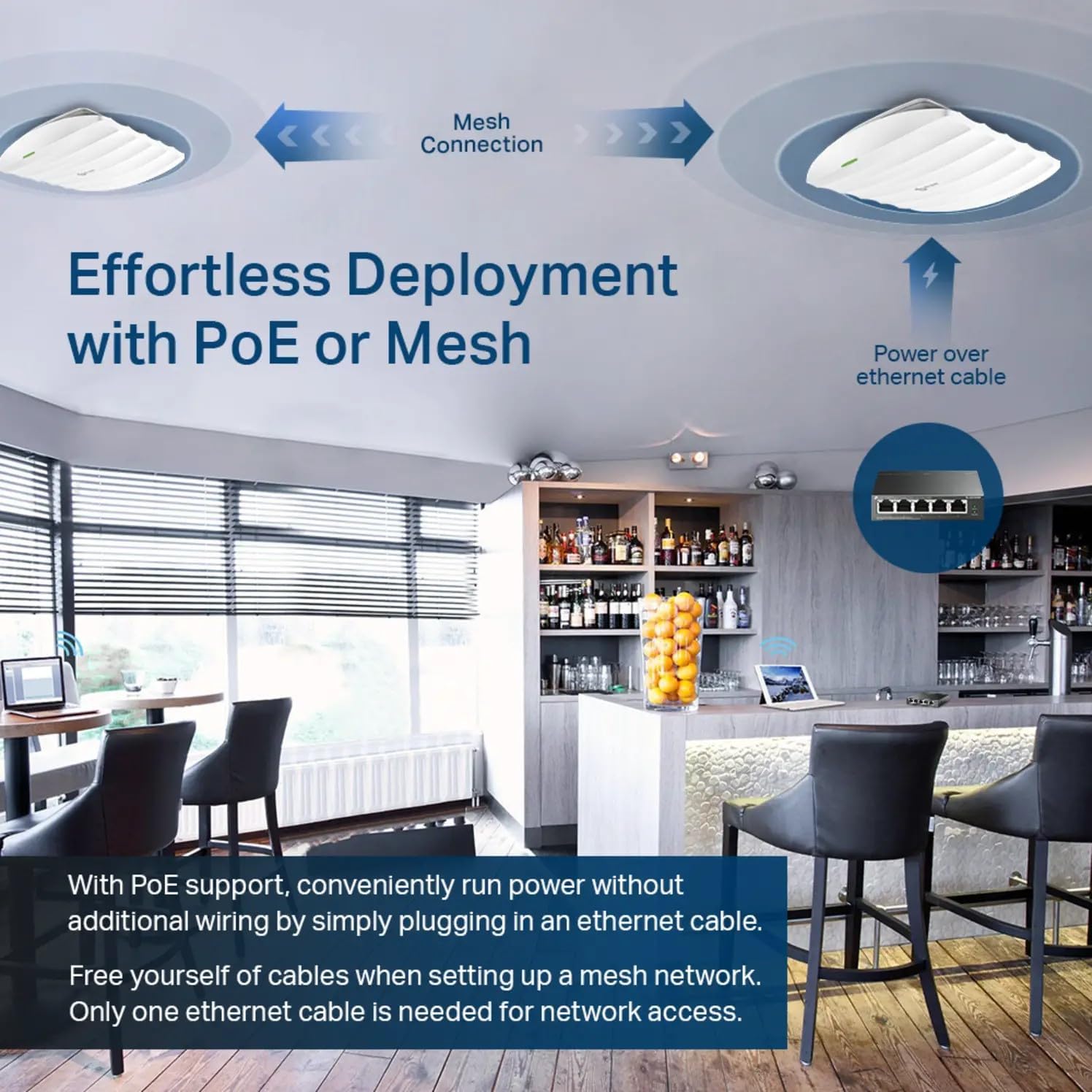
EAP225 supports both 802.3af PoE and passive PoE power supply, can be either powered by a PoE switch or the provided PoE adapter, making deployment effortless and flexible.
maximum wireless transmission rates are the physical rates derived from IEEE standard 802.11 Specifications. Range and coverage specifications along with the number of connected devices were defined according to test results under normal usage conditions. Actual wireless transmission rate, wireless coverage, and number of connected devices are not guaranteed, and will vary as a result of 1) environmental factors, including building materials, physical objects and obstacles, 2) network conditions, including local interference, volume and density of traffic, product location, network complexity, and network overhead and 3) client limitations, including rated performance, location, connection quality, and client condition.
mu-mimo capability requires client devices that also support MU-MIMO.
seamless roaming requires both the access point and client devices to support 802.11K and 802.11V protocols.
𝐒𝐮𝐩𝐞𝐫𝐢𝐨𝐫 𝐒𝐩𝐞𝐞𝐝𝐬 𝐰𝐢𝐭𝐡 𝐌𝐔-𝐌𝐈𝐌𝐎: Designed with the latest 802.11ac Wave 2 MU-MIMO technology, the EAP225 reliably delivers dual-band Wi-Fi speeds up to 1350 Mbps to multiple devices simultaneously.
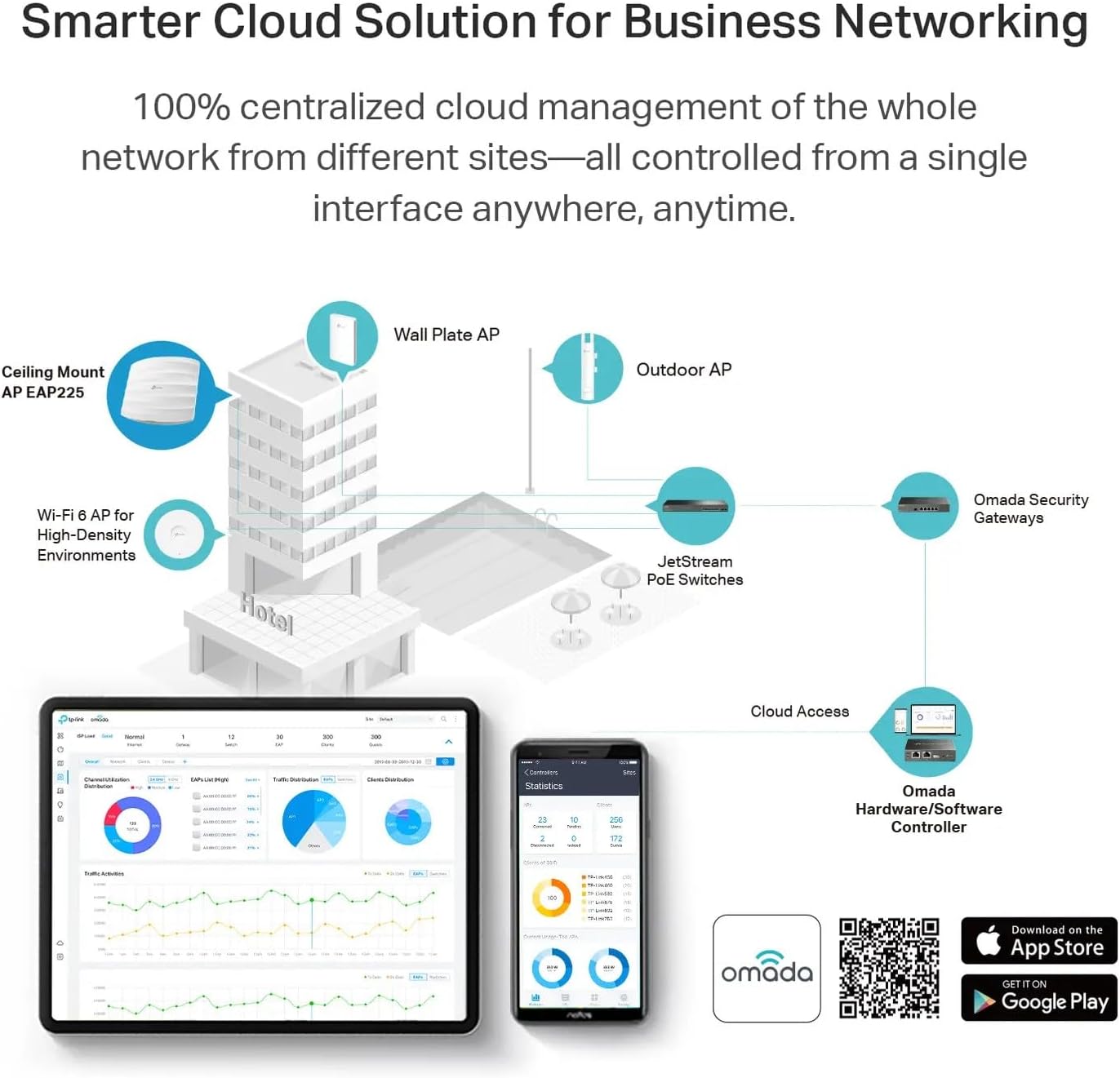
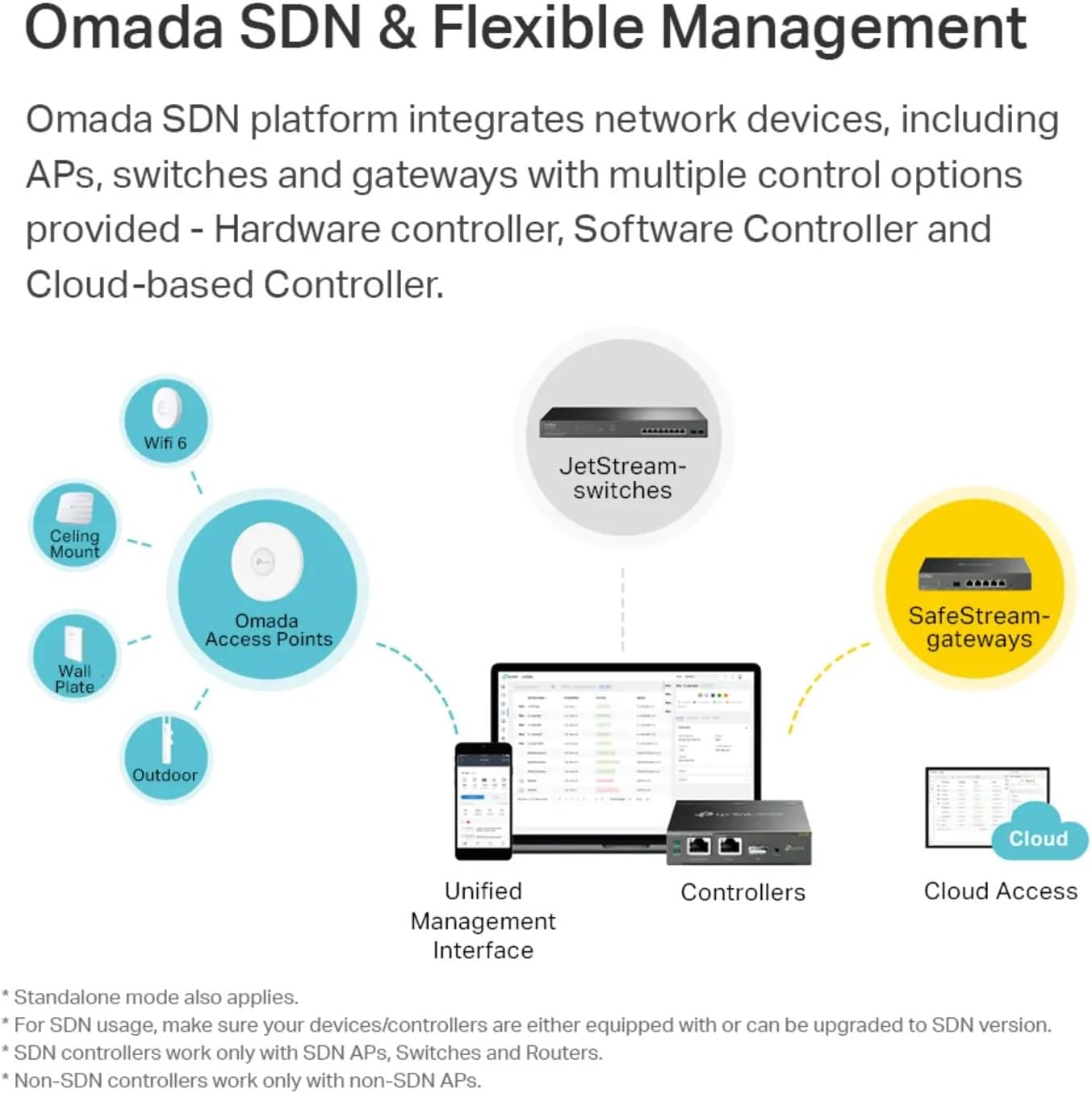
𝐈𝐧𝐭𝐞𝐠𝐫𝐚𝐭𝐞𝐝 𝐢𝐧𝐭𝐨 𝐎𝐦𝐚𝐝𝐚 𝐒𝐃𝐍: Omada’s Software Defined Networking (SDN) platform integrates network devices including access points, switches and gateways with multiple control options offered – Omada Hardware controller, Omada Software Controller or Omada cloud-based controller(Contact TP-Link for Cloud-Based Controller Plan Details). Standalone mode also applies.
𝐂𝐥𝐨𝐮𝐝 𝐀𝐜𝐜𝐞𝐬𝐬: Remote Cloud access and Omada app brings centralized cloud management of the whole network from different sites—all controlled from a single interface anywhere, anytime.
𝐒𝐃𝐍 𝐂𝐨𝐦𝐩𝐚𝐭𝐢𝐛𝐢𝐥𝐢𝐭𝐲: For SDN usage, make sure your devices/controllers are either equipped with or can be upgraded to SDN version. SDN controllers work only with SDN Access Points, Switches and Gateways. Non-SDN controllers work only with non-SDN APs.
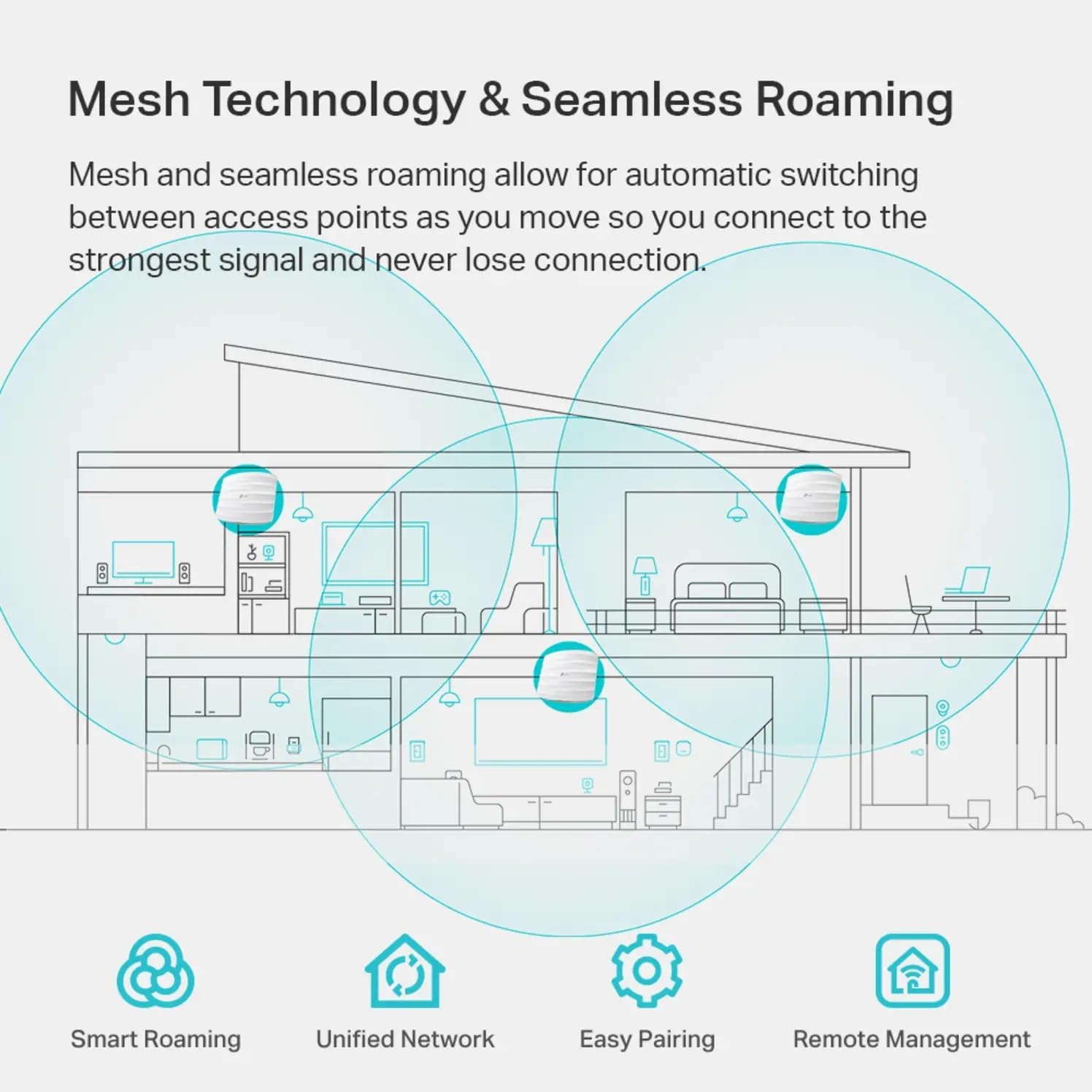
𝐀𝐝𝐯𝐚𝐧𝐜𝐞𝐝 𝐖𝐢𝐫𝐞𝐥𝐞𝐬𝐬 𝐓𝐞𝐜𝐡: Supports Mesh WiFi, Seamless Roaming(Omada Mesh and Seamless Roaming require the use of Omada SDN controllers), Band Steering, Airtime Fairness and Beamforming technologies.
𝐌𝐮𝐥𝐭𝐢𝐩𝐥𝐞 𝐏𝐨𝐄 𝐎𝐩𝐭𝐢𝐨𝐧𝐬 𝐟𝐨𝐫 𝐄𝐚𝐬𝐲 𝐈𝐧𝐬𝐭𝐚𝐥𝐥𝐚𝐭𝐢𝐨𝐧: EAP225 supports both 802.3af/at PoE and Passive PoE power supply, can be either powered by a PoE switch or the provided PoE adapter, making deployment effortless and flexible.
𝟓 𝐘𝐞𝐚𝐫𝐬 𝐖𝐚𝐫𝐫𝐚𝐧𝐭𝐲: Backed by our industry-leading 5-years warranty and free technical support from 6am to 6pm PST Monday to Fridays, you can work with confidence.
8 reviews for TP-Link EAP225 Omada AC1350 Gigabit Wireless Access Point Business WiFi Solution w/Mesh Support, Seamless Roaming & MU-MIMO PoE Powered SDN Integrated Cloud Access & Omada App White


Related products


ARTIX CL750 Over Ear Headphones Wired with Mic & Volume Control, Audio with 100% Noise Cancelling Computer Wired, Plug in for Laptop, Dj Corded Studio Headphones


REOLINK Duo 3 PoE 16MP UHD Dual-Lens PoE Security Camera with 180° Panoramic View, Motion Track, F1.6 Color Night Vision, Person/Vehicle/Animal Detection, 2 Way Talk, Supports 24/7 Recording


Senso Bluetooth Headphones, Best Wireless Sports Earphones w/Mic IPX7 Waterproof HD Stereo Sweatproof Earbuds for Gym Running Workout 8 Hour Battery Noise Cancelling Headsets (Black Blue)


vdawg –
Great wifi access point
I bought one of these for the opposite end of my ranch-style house, since my router’s wifi was weak at that distance. I like that it’s POE, so I only had to run a CAT5e cable to it and hook it to my POE switch (although it comes with its own POE power injector which is a nice bonus). The setup was fairly straight forward using the app to get it set up initially, and later using the built-in web admin page through a browser for additional changes.It puts out a decent signal, but I was a bit disappointed in that it didn’t quite make it from its location to my office, which is on the same level, but about 50 feet away with about 3 hollow (stud/drywall) walls between. My office seems to be somewhat of a dead zone in the house due to its layout, so I ended up buying another for near my office, creating a triangle around the perimeter of the house with my router and the two APs. When you’re within 20-30 feet of the AP and no walls, it works very well and signal is quite strong.In my tests, it provided full throughput for my internet service, just make sure you connect it to a gigabit router and/or POE switch or it will only operate at the speed of the slowest link. My existing POE switch was only 100 mbps (for security cameras), so the switch was limited to that throughput, so I added a gigabit POE switch and connected the APs to that instead and they now show full throughput on internet speed tests.One feature I really liked was the ability to add additional SSIDs. During initial setup it asks for your 2.4GHz and 5GHz passwords, but I also have a 2.4GHz and 5GHz guest networks on my router. After the initial setup, I went into the browser interface and found a small “add” (+) button near the list of SSIDs and I was able to add the guest network SSIDs for each frequency. I was also able to select them as “Guest” networks in the AP configuration pages. I duplicated the SSIDs from my router and there doesn’t seem to be any conflicts. Wirelress devices just seem to pick up their connection from the closest AP or the router depending on where they are in the house, which is how I hoped it would work.For installation, the mounting plate attaches to the ceiling, then you “twist” the device into to three “tabs” until it lock in place. This part was a bit tricky as the tabs seemed tight. Getting it to twist into the tabs is difficult to align as you place the AP over the bracket, and I really had to push the AP up and rotate it hard to get it to snap into the bracket. The “snapping” process on one of them took a lot of force and I thought I broke it when it finally locked in, but it was fine. It has a tab you can insert a paper clip into to release it from the bracket for removal. I think the mounting plate design could use a bit of a rework given my experience, but it’s certainly not a reason to pass this by.Another inconvenience was the fact that updating the firmware causes all your settings to be lost. This happened with both devices. I hope future updates don’t require a full reconfiguration of the device each time.I’m looking forward to great wifi throughout my house now. So far, the devices that were previously located in a “dead” or “weak” spot (for example, streaming boxes that could only able to get 1-3 mbps) now get 90+ mbps so it definitely solved those issues. Just be aware that depending on the size and layout of your home, you may need more than one. I didn’t want this to be visible in the center of my living room ceiling (which is the center of my home), so I had to install them in hallways which are more on the perimeter of the home, thus needing more than one to get full coverage.For the price, this was an excellent choice for our home and I highly recommend it.
TheMortalVirus –
Best Access Point I’ve paid for
The access point comes with wall mount easy to install supports POE {Power Over Ethernet} but does come with a power brick shortttt cable like welp better have a POE device because the cable is only long enough to be waste high i’m 6ft 2″ so yeahhhhhhhhhh luckily i have a POE switch by Araknisoverall power brick needs to be longerTech Support even though the company is not US based SUPPPER NICE for meWifi Signal has it all and oddly lol 6GHz yeah this router has 2.4GHz, 5GHz, and 6GHzwifi is strong and solid doesn’t failUSER INTERFACE i’ll simply laugh at that as most people doing this BETTTTTERRRR UNDERSTAND NETWORKING because if your have no clue what IPVSEC or ipv6 or vlan and much more then don’t waste your money THIS IS NOT PLUG AND PLAYI’m not afraid to say this about myself ZERO NETWORKING DEGREE or knowledge before entering hell my knowledge is mostly codding and script development so when coming into this i was waaaaayyyyy over my head because not only did i buy this access point i got the tp-link switch and vpn router as well as the controller i went with the whole wham bammm welcome to networking situationAll of tp links stuff can be used in “standalone” meaning you dont need everything to make one thing to work but even then it’s a hassle5 weeks i finally figured out the vpn router by tp link1 day with the switch it’s a switch give it internet and thats it (There’s more to it but simply no configuration needed with switches in depth you can designate a whole side or some ports limit such and so on)9 weeks yes 9 weeks to understand the wifi access point again me no clue what i’m doing but did this so can anyone do it yes was it EASY heck no can say and know that if i go into networking school i basically understand it allthe controller controls everything! makes it easy but man oh man i do understand networking now ahhaah
intraining4life –
Exceeded expectations — excellent range and stable connections
Installed this 3 years ago in a rural setting for a ring camera setup approximately 500 ft from antenna. Good line of sight with only a tree partially obstructing. Only one connectivity issue in three years due to prairie winds “adjusting” the antennas.Recently had a need to test the range for an additional camera. Was able to obtain a good connection at nearly 600 feet, direct line of sight. Couldn’t be more pleased with ease of setup, range and signal stability. Your mileage will vary depending on obstructions and level of RFI noise.Extreme cold, heat and moisture on Colorado eastern plains didn’t touch it.
Heng –
worked well. 2.4G travels further than 5G.
Kindle Customer –
Morreu após menos de 1 ano de uso. Não estava exposto à chuva nem ao tempo. Simplesmente parou de funcionar. O RMA da TPLink não responde.
Vijay Kalekar –
I was struggling to find a better access point which would give max speed and best coverage. I now have zero issues with WiFi. It’s as good as wired network. Go for it without doubt.
yellowgolfcat –
This is easy to set up provided you are comfortable in configuring it (as you would a primary router), for example you need to go into the ‘router’ settings and manually add a password. Being wired, this gives much better wifi coverage than a wireless connection.
Chetan –
Nice ProductStrength NetworkValue for money