




TP-Link EAP650 Ultra-Slim Wireless Access Point | Omada True WiFi 6 AX3000 | DC Adapter Included | Mesh, Seamless Roaming, WPA3, MU-MIMO | Remote & App, Multi Control Options | PoE+ Powered
Original price was: $129.99.$79.99Current price is: $79.99.
Price: $129.99 - $79.99
(as of Feb 07, 2026 17:41:07 UTC – Details)
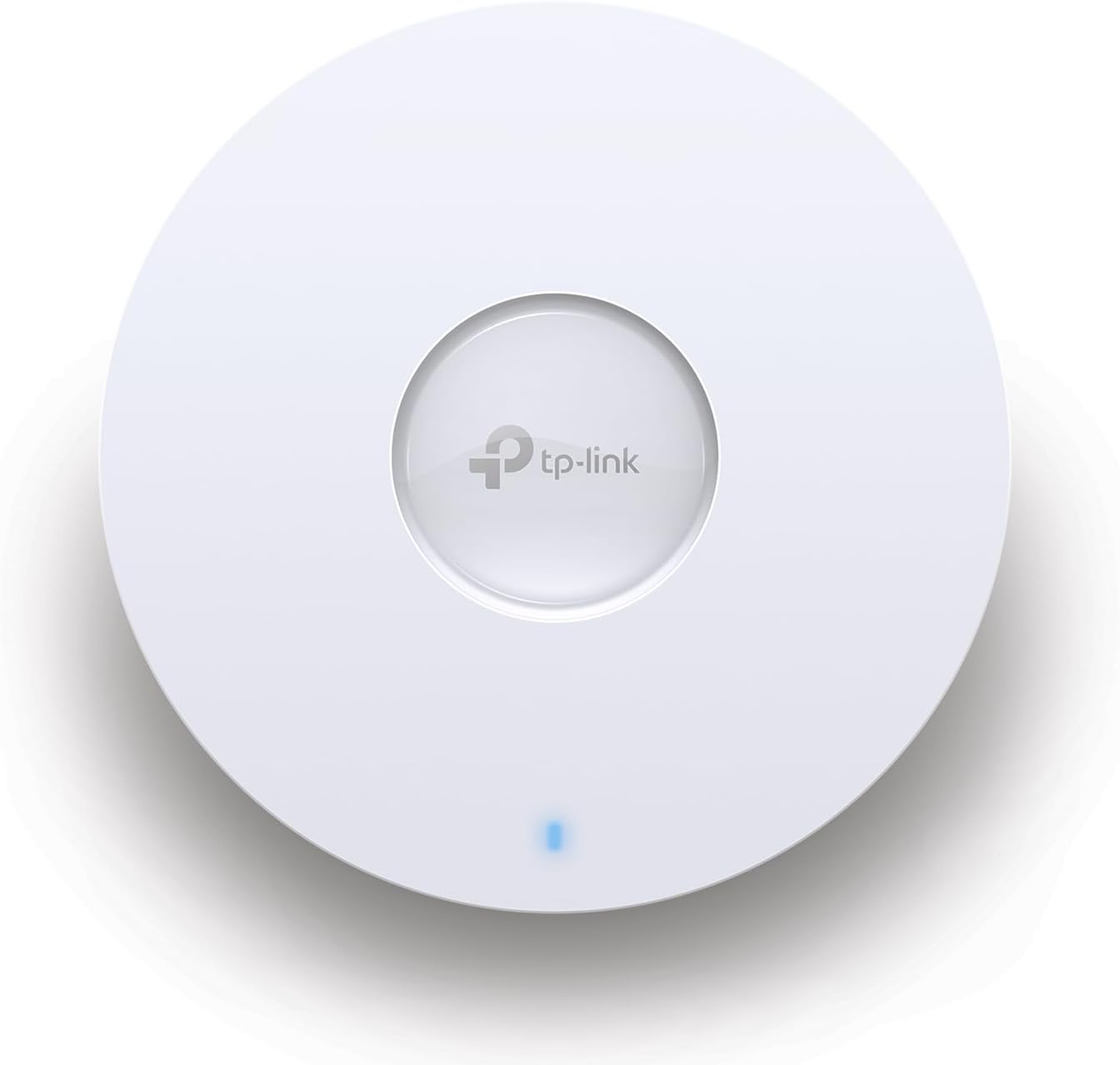
AX3000 Ceiling Mount Wi-Fi 6 Access Point w/ DC Power Adapter.
𝗙𝗥𝗘𝗘 𝗢𝗠𝗔𝗗𝗔 𝗘𝗦𝗦𝗘𝗡𝗧𝗜𝗔𝗟𝗦: Free cloud management with no additional fees, everything is managed in the cloud without the need for hardware or software controllers. Simply launch the Omada app, scan the S/N code on the package, and you’re ready to deliver.
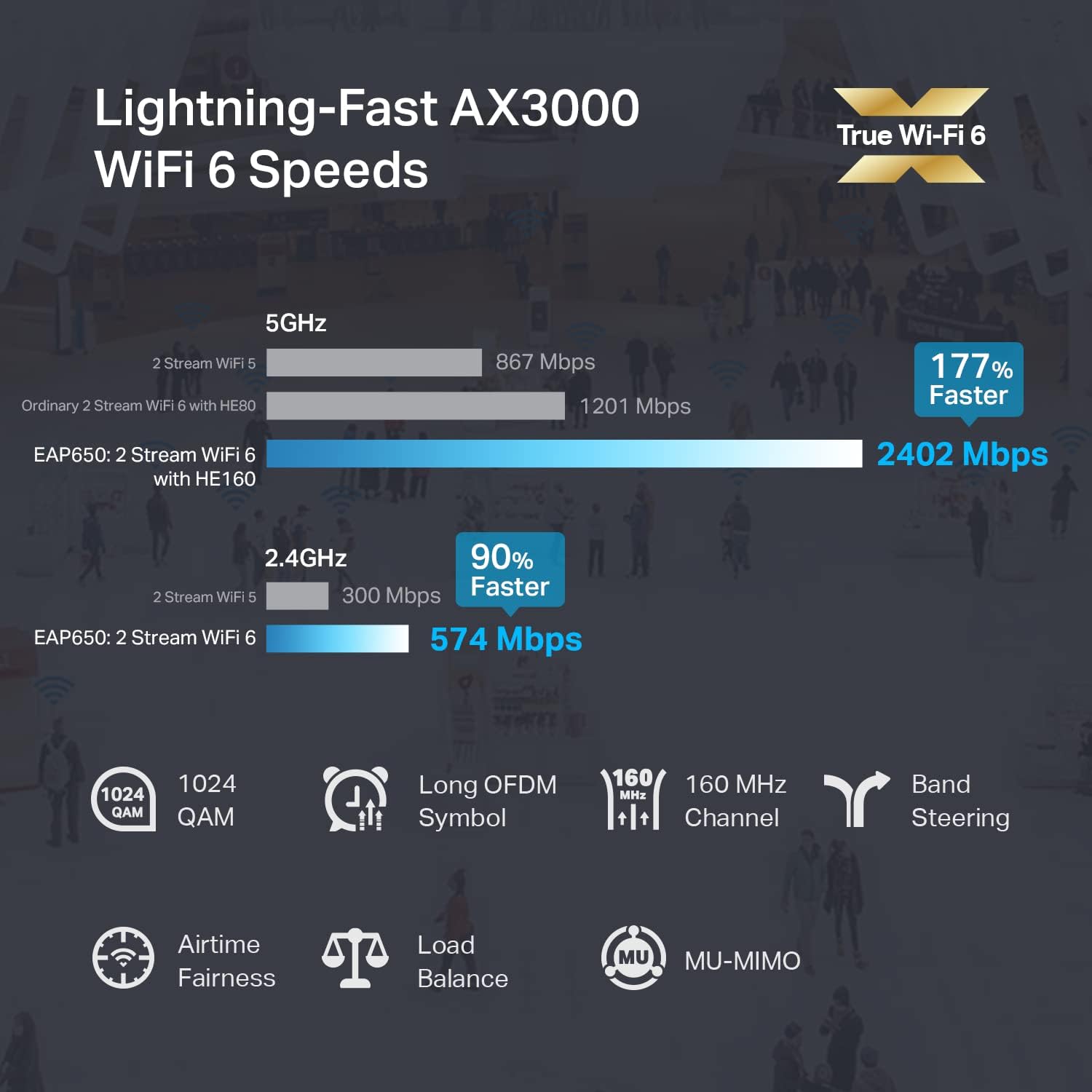
𝐔𝐥𝐭𝐫𝐚-𝐅𝐚𝐬𝐭 𝐓𝐫𝐮𝐞 𝐖𝐢-𝐅𝐢 𝟔 𝐒𝐩𝐞𝐞𝐝𝐬: Designed with the latest wireless Wi-Fi 6 technology featuring 1024-QAM, HE60 and Long OFDM Symbol, the EAP650 boosts dual-band Wi-Fi speeds up to 2976 Mbps.
𝐔𝐥𝐭𝐫𝐚-𝐒𝐥𝐢𝐦 𝐃𝐞𝐬𝐢𝐠𝐧: Compact design ensures simple installation while saving space. The elegant appearance makes EAP650 a perfect blend into any modern office, hotel, classroom, or café.
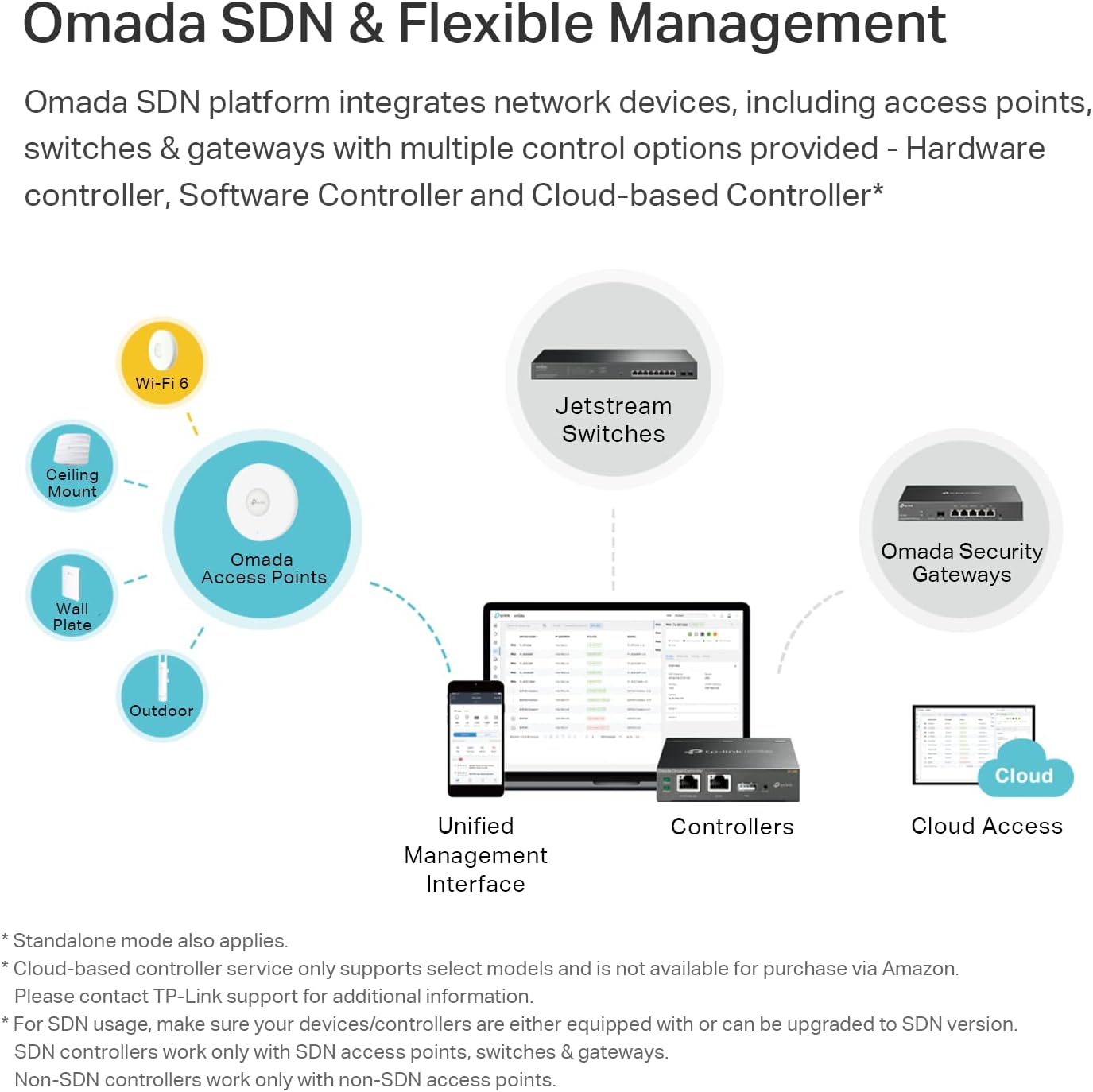
𝐈𝐧𝐭𝐞𝐠𝐫𝐚𝐭𝐞𝐝 𝐢𝐧𝐭𝐨 𝐎𝐦𝐚𝐝𝐚 𝐒𝐃𝐍: Omada Software Defined Networking (SDN) platform integrates network devices including access points, switches gateways with multiple control options offered – Omada Hardware controller, Software Controller or Cloud-based controller(Contact TP-Link for Cloud-Based Controller Details). Standalone mode also supported.
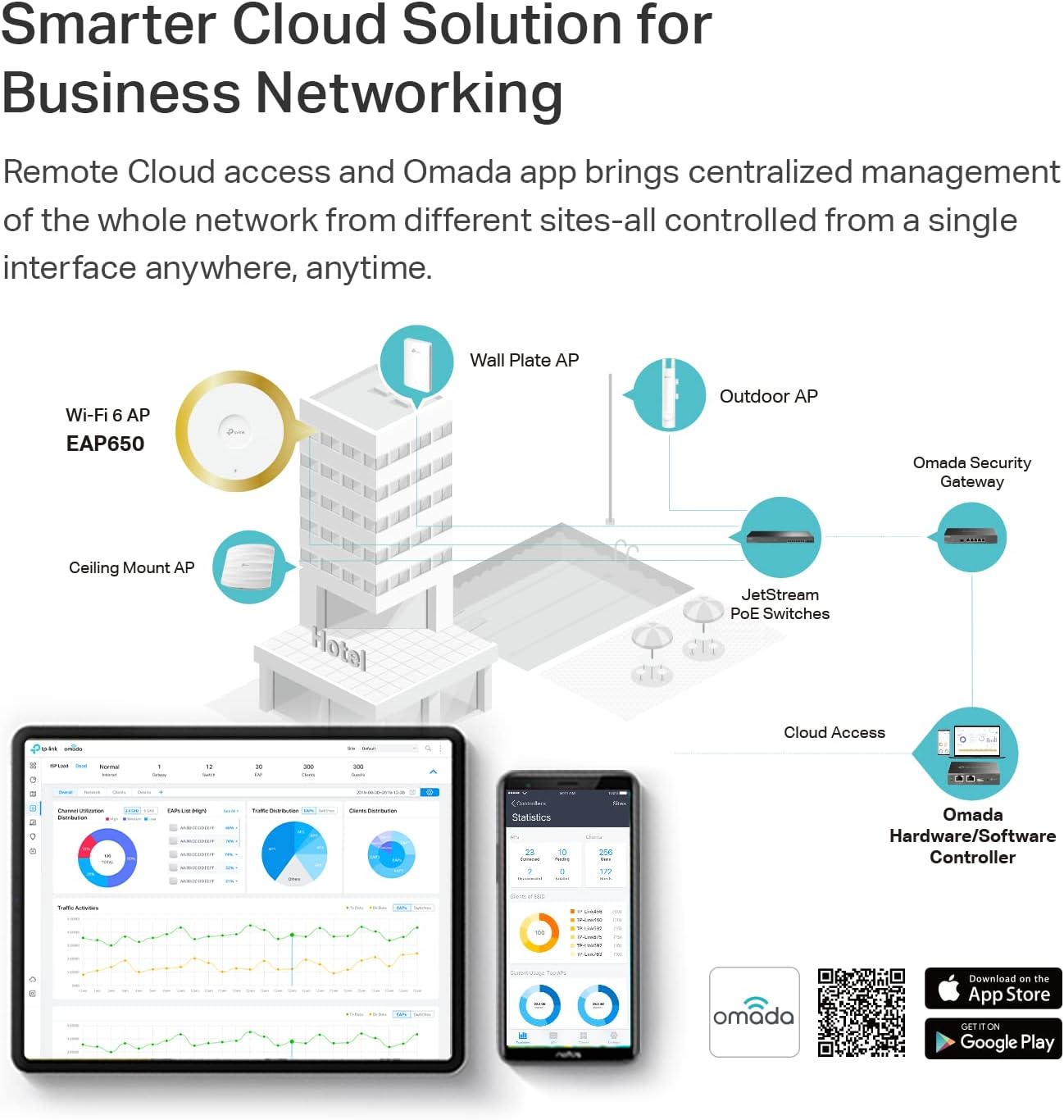
𝐂𝐥𝐨𝐮𝐝 𝐀𝐜𝐜𝐞𝐬𝐬 𝐎𝐦𝐚𝐝𝐚 𝐂𝐨𝐦𝐩𝐚𝐭𝐢𝐛𝐢𝐥𝐢𝐭𝐲: Remote Cloud access and Omada app enables centralized cloud management of the whole network from different sites – all controlled from a single interface anywhere, anytime.
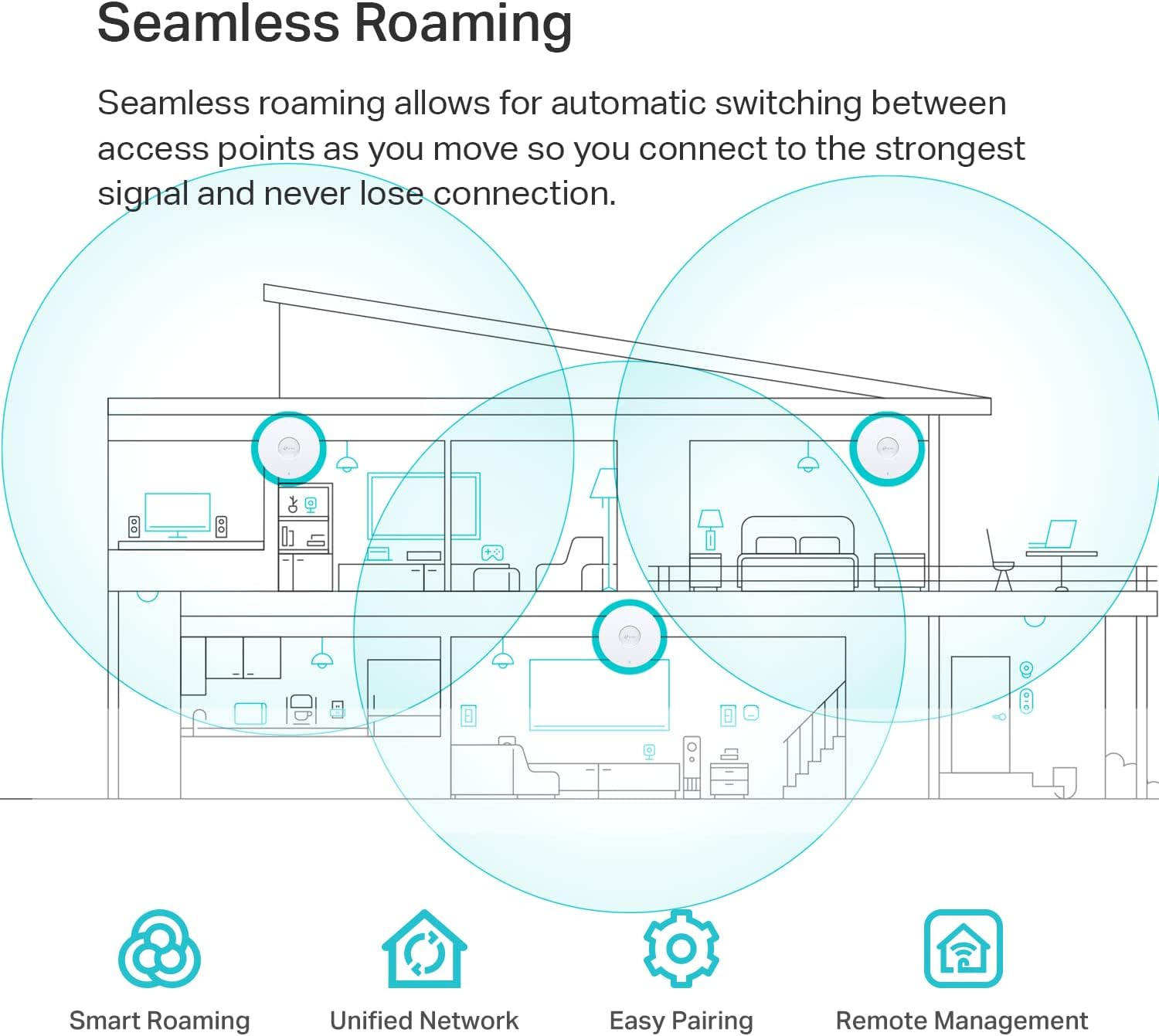
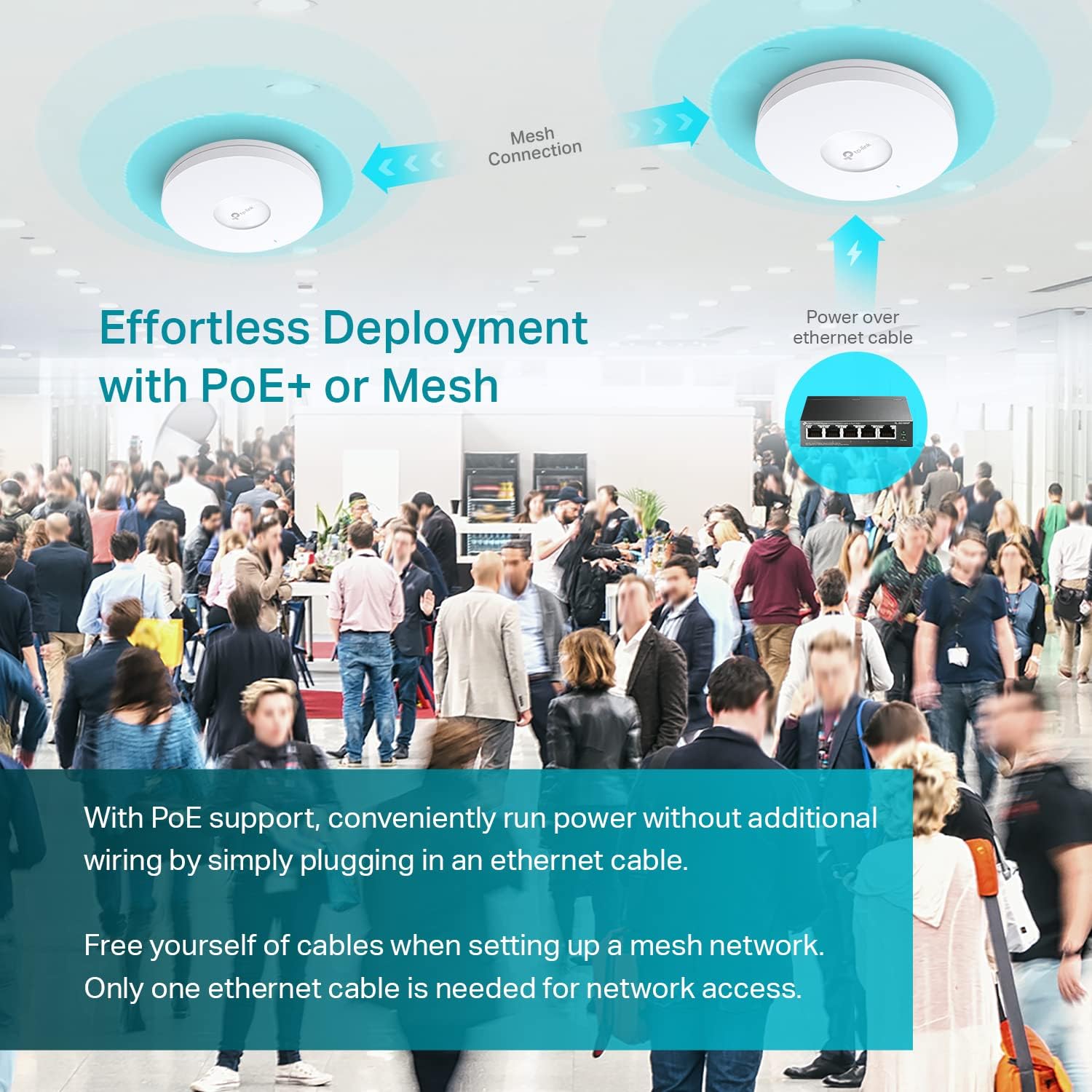
𝐀𝐝𝐯𝐚𝐧𝐜𝐞𝐝 𝐖𝐢𝐫𝐞𝐥𝐞𝐬𝐬 𝐓𝐞𝐜𝐡: Supports Mesh WiFi, Seamless Roaming(Omada Mesh Seamless Roaming require the use of Omada SDN controllers), WPA3, Band Steering, Load Balancing, Airtime Fairness and Beamforming technologies.
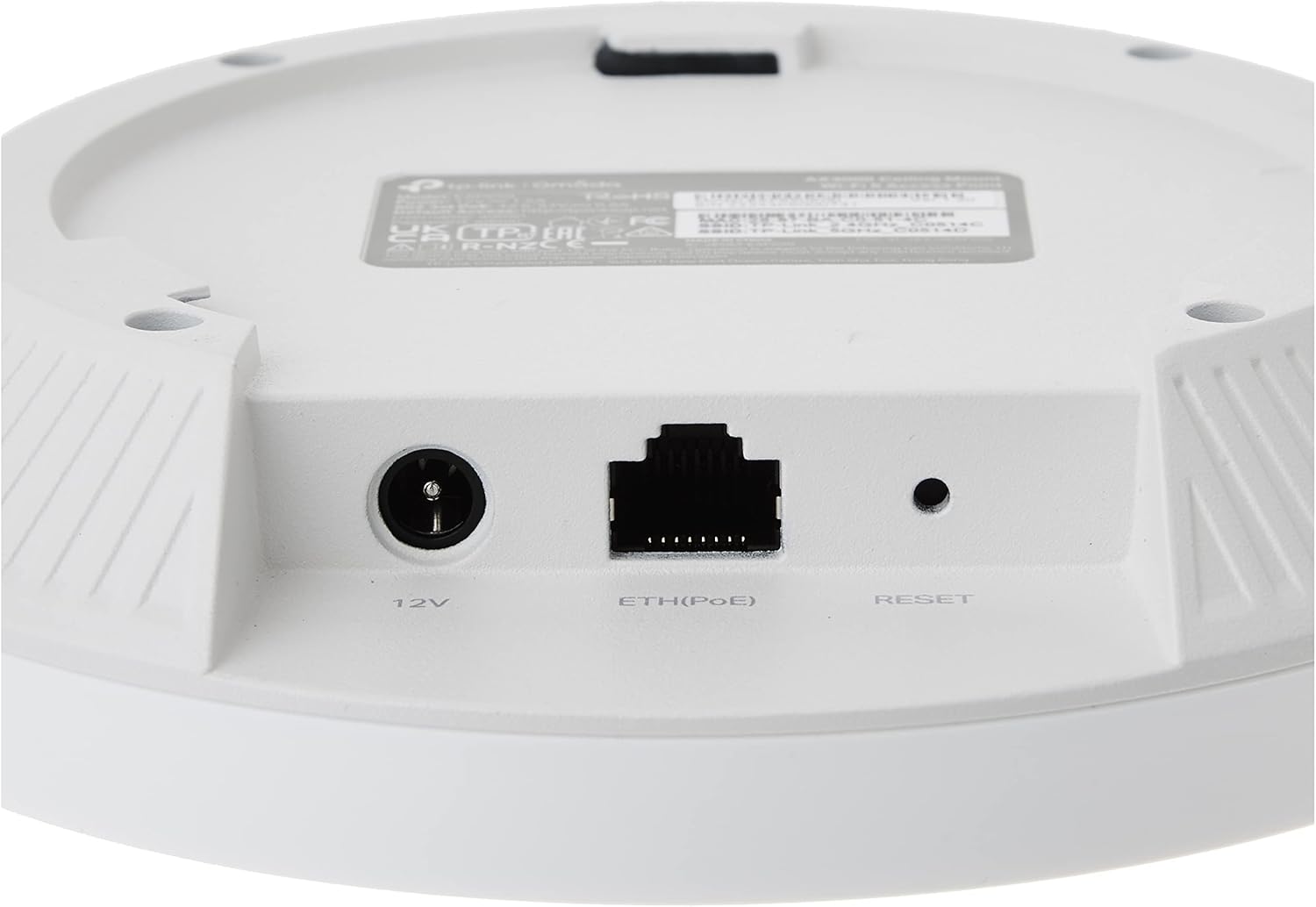
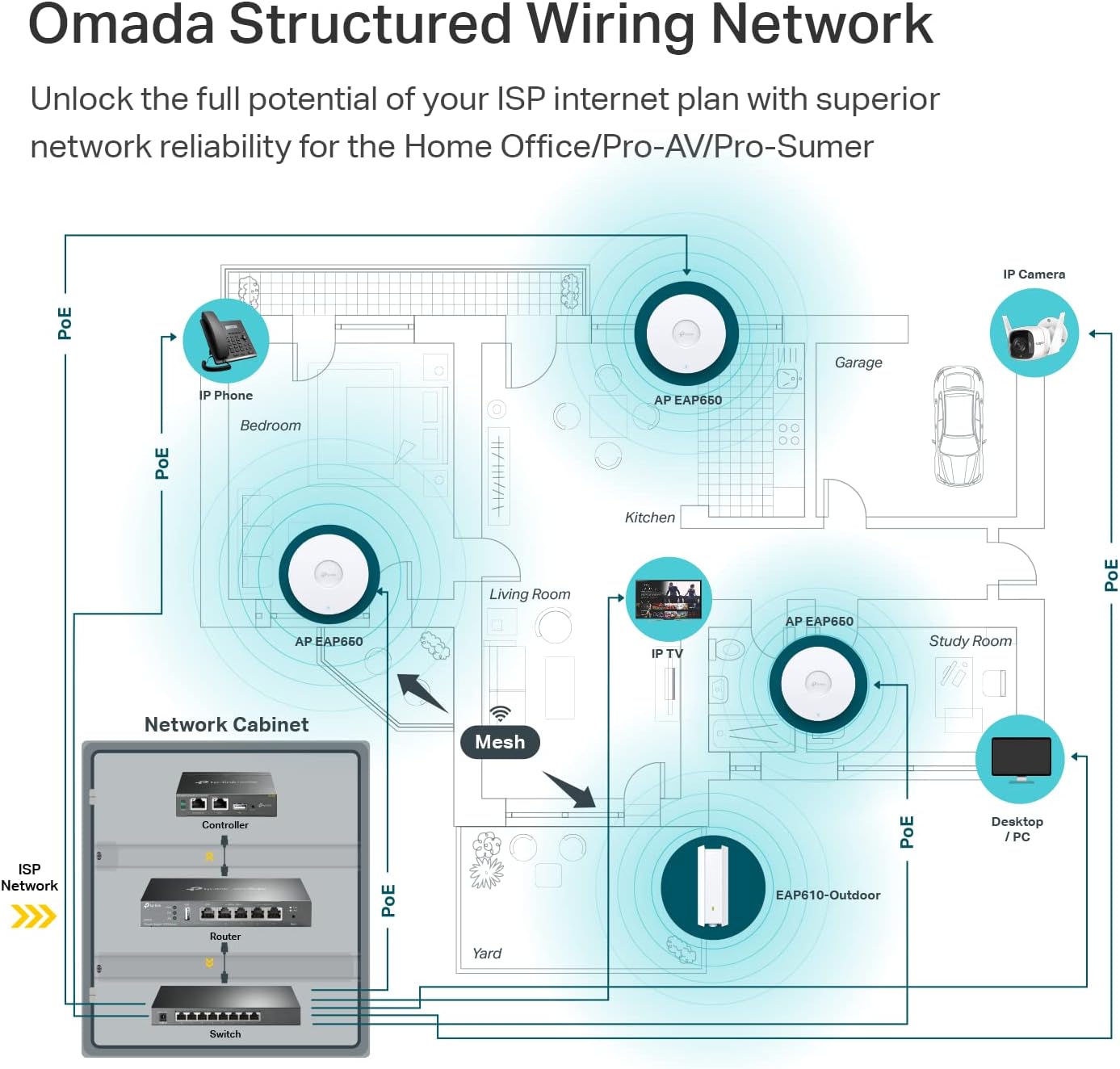
𝐌𝐮𝐥𝐭𝐢𝐩𝐥𝐞 𝐏𝐨𝐰𝐞𝐫𝐢𝐧𝐠 𝐎𝐩𝐭𝐢𝐨𝐧𝐬 𝐟𝐨𝐫 𝐄𝐚𝐬𝐲 𝐈𝐧𝐬𝐭𝐚𝐥𝐥𝐚𝐭𝐢𝐨𝐧: EAP650 supports 802.3at PoEplus, 48V/0.5A Passive PoE and 12V/1.5A DC power supply, can be either powered by a TP-Link PoEplus switch, a Passive PoE adapter (Suggested TP-Link Model: TL-PoE4824G) or the provided 12V/1.5A DC adapter, making deployment effortless and flexible.
𝟓 𝐘𝐞𝐚𝐫𝐬 𝐖𝐚𝐫𝐫𝐚𝐧𝐭𝐲: Backed by our industry-leading 5-years warranty and free technical support from 6am to 6pm PST Monday to Fridays, you can work with confidence.
10 reviews for TP-Link EAP650 Ultra-Slim Wireless Access Point | Omada True WiFi 6 AX3000 | DC Adapter Included | Mesh, Seamless Roaming, WPA3, MU-MIMO | Remote & App, Multi Control Options | PoE+ Powered


Related products


Anpviz 6MP PoE Camera, Turret 6MP UltraHD IP Camera Outdoor with Mic & Speaker, 100FT Smart Color Night Vision, PoE Security Cameras with AI Human Vehicle Detection, MicroSD Slot (U Series)


ARTIX CL750 Over Ear Headphones Wired with Mic & Volume Control, Audio with 100% Noise Cancelling Computer Wired, Plug in for Laptop, Dj Corded Studio Headphones


Senso Bluetooth Headphones, Best Wireless Sports Earphones w/Mic IPX7 Waterproof HD Stereo Sweatproof Earbuds for Gym Running Workout 8 Hour Battery Noise Cancelling Headsets (Black Blue)


TP-Link Deco 7 BE25 Dual-Band BE5000 WiFi 7 Mesh Wi-Fi System | 4-Stream 5 Gbps, 240 Mhz | Covers up to 6,600 Sq.Ft | 2X 2.5G Ports Wired Backhaul | VPN,MLO, AI-Roaming, HomeShield, 3-Pack


Slippery Pete –
The perfect solution!
I’ve messed around with trying to place my router in my house, moving it around, changing antenna, putting in boosters… everything to try to get a better signal. I had heard about these on a podcast and decided to give them a try and they work really well. I went with the Omada ones because I picked up the OC300 as well. It has been SOOOO easy to add new access points where needed. I have one on each floor and one outside and paired with the OC300 makes setting up a breeze.Pros:* Easy to set up – if you don’t get an OC200 or OC300 (or use a Raspberry Pi or computer to run their software for free), you simply log in, set up your WiFi networks and you’re on your way. With the OC200/300, you just “adopt” the device and it sets everything up. I now change my WiFi every time I have people over so I can personalize it to them and it keeps them off my primary network.* POE – Don’t want to run power to where you want this? No problem! Just run an ethernet cable and power it over that.* Comes with everything you need for mounting* Great signal strength and covers a lot of area.* I’ve bought all of mine on sale but I would pay full price if needed one in a hurry. Extremely good value for what you get.* There are hidden solutions you can get but people have commented how it looks like I have “professional wireless” in my house. These look just like what you’ll find in an office, if that is important to you.Cons:* None – I’ve been very happy.I’ve switch everyone in my family to these along with an OC200 to run them. Since they have asked me to help them with their networking stuff in the past, it has made my life really easy to be able to run these. I highly recommend them.
markr –
Excellent Outdoor Access Point
Excellent outdoor access point. Setup through the Omada app was straightforward, and the unit delivers strong, stable coverage over a long distance. Once mounted and powered, it just works. Signal stays solid even through walls and across open areas, and it handles multiple devices without dropping. If you need reliable outdoor WiFi with real range, this is a great choice. It is easy to setup, it is small and well made.
FlawlessJuiceBox –
Blazing fast, reliable, and customizable!
I’ve recently re-worked my home network to use all Omada APs and switches.One access point looks to be enough to cover my whole home, but I may add more in the future.The AP can broadcast multiple SSIDs, VLANS, and bands to allow support for older devices.Pro tip: As long as one AP is plugged into your network with Ethernet, you can connect others using “Omada Mesh”This is great for the “prosumer” who wants to standardize their home network, but is also easy enough for anyone to configure.
Naran K. Patel –
EAP670 V2 absolutely fantastic access point, works at distance, everything has stable WiFI!
I’ve had routers from many of the usual manufactures; Asus, Netgear, Tplink, Linksys, etc. They are ok, but have issues, I already have good router and I just need them to work as bridges or for their wifi, but they are pretty poor at doing just this function. In fact, I would say most work ok at routers but I don’t need them for that, but are poor at WiFI with unstable, unreliable WiFi connections if they connect to devices at all!!I come across Omada range which is really commercial grade WiFi gear but I focused on their access points specifically the EAP670 V2. They are fairly easy to setup, but there is a learning curve which mobile and web app make reasonably easy to setup if you are familiar with wifi routers in general, if not, the learning videos are quite helpful.I have around 100 wifi devices in the home, and I mean everything connected flawlessly and was stable with EAP670 V2, especially in mesh and roaming mode, they would move to another EAP670 V2 as needed. I would caution not turning on all roaming features, just the core ones only, since some older devices just don’t work well but EAP670 basic defaults worked well in most cases. I was so impressed I bought the OC200 to help manage all the EAP670 I had purchased, and place strategically around the home to cover all the blind spots but at the sametime minimize overlaps, ensuring to place each of access points at least 12 meters apart to keep interference low between devices.The software looks like its based on opensource SDN technology (a good thing). I would say that Omada brand has made excellent use of its features/capabilities but the most important thing has maintained a level of quality and reliability that truly shocked me after spending 18+ years working with other wifi routers and expecting another so so slight improvement, but the improvement here in terms of quality, reliability and stability overall is a great leap forwards. I have device on wifi network that parodically just failed to connect or stopped working, these now just stay connected and work flawlessly, that amazing! It should have been this way a long time ago, but I guess you have to wait for large leap forwards in quality, reliability and stability.I’ve had access points and controller for over a month now, working flawlessly. I highly recommend the EAP670 V2 and OC200 controller. I haven’t tried Omada brand switches and routers but if their access points are this good it may worth considering in the future. I use Mikrotik brand of switches, routers and I really like them for their deep level of configurability (not for faint of heart or everyone), quality, stability and reliability, interestingly also based on open source technology.
Jake –
Great Coverage, but Band Steering Needs Work
The Omada Access Point delivers excellent coverage and integrates smoothly with the Omada Software Controller, making setup and management simple. Speeds are fast and reliable once connected, and roaming between APs works well in my setup. My only complaint is the “seamless” band steering between 2.4GHz and 5GHz — it’s not truly seamless. I’ll sometimes have full Wi-Fi bars but can’t load anything for a few seconds while it switches bands, which can be frustrating during calls or streaming. Overall, it’s still a great AP for the price, but I hope TP-Link improves the band steering in future firmware updates.
Bahaa Hudairi –
Great product. Excellent range
Andrey –
Gerência diversos cenários, inclusive para rede de convidados, restringindo e o acesso à rede do cliente.
Fernando Aurelio Ruiz de Chavez Olvera –
Excelente producto!
Rick M –
Set up was a little confusing reading the directions. But after installing the app and following step-by-step, it was easy to figure out. The AX 3000 EPA 650 outdoor once installed works amazing. My outdoor Wi-Fi went from 25 MB to over 700 MB. After it was all connected. Make sure to do your research to see if this will work for you. It is a good product and provides great wifi signal where needed. I noticed that any trees or other obstructions very quickly reduce the signal. So make sure you place it in an area that will offer the best coverage.
Juan Villaseñor –
Me han endulzado la vida literalmente. Gracias por hacerme llegar el punto de acceso Eap650-outdoor. Con este equipo tengo planeado llevar el internet por wifi a una distancia muy considerable de mi casa, calculo 100 mts. Pronto actualizaré está publicación para hacer una reseña más extensa y algunas fotos de la implementación.