






Yxk Zero1 2-Bay Desktop NAS, Maximum 60TB (Diskless), User-Friendly Home NAS Storage, Private Security & Remote Access, Silent, 4GB RAM, 2.5GbE Port, 4K HDMI, Network Attached Storage
$149.99
Price: $149.99
(as of Feb 12, 2026 08:25:29 UTC – Details)
Product description


1 Home NAS
2 Interfaces
3 Better Value


1 IRONCOW OS
2 Easy Sharing
3 Widely Compatible


1 Remote Access
2 2.5GbE Transfer
3 Smooth 4K Video
4 Video Library


1 Account Security
2 Access Security
3 Equipment Monitoring
4 Model Comparison
5 Upcoming Plans
Advanced Storage Management & Resilience: Yxk NAS ensures data integrity through enterprise-grade features like RAID redundancy, automated backups, and snapshot recovery, safeguarding your information against single drive failures.
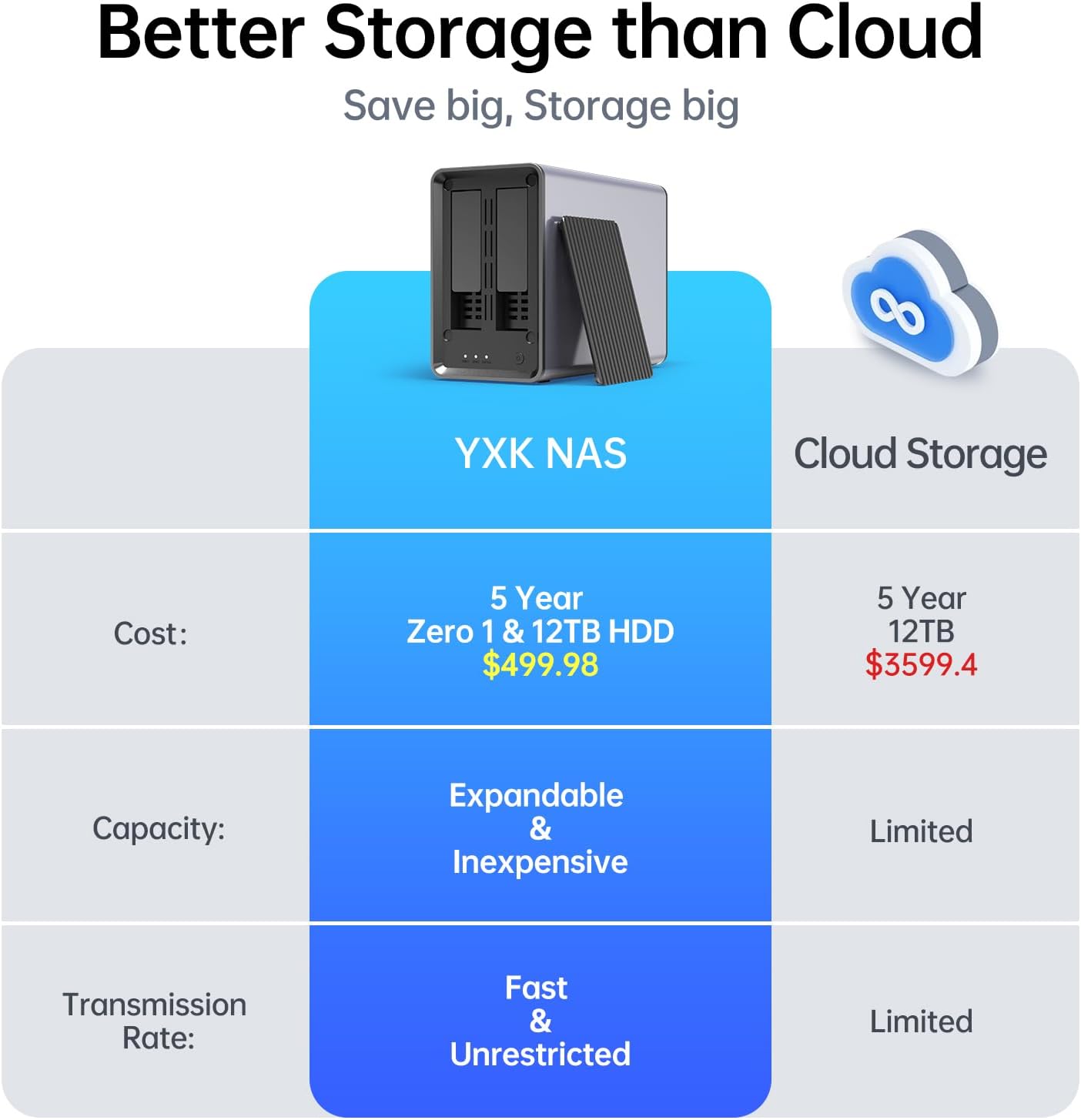
Scalable Capacity Without Recurring Costs: Expand storage seamlessly by adding drives or upgrading existing ones. Unlike cloud services with ongoing subscriptions and capacity limits, this home NAS offers flexible, one-time hardware investment for true ownership.
Intuitive Setup & Effortless Control: Get started instantly via QR code scanning. Our comprehensive mobile/desktop app provides a unified, user-friendly interface for all functions, ensuring a smooth and efficient management experience.
Truly Private & Secure Cloud: Maintain 100% data ownership within your personal cloud. Advanced encryption and granular permission controls protect files during collaboration, while our strict zero-knowledge policy guarantees we never access or store your data.
Effortless Multi-User Collaboration: Securely share and synchronize data across diverse devices and platforms with family, friends, or colleagues. Enable seamless teamwork while preserving individual privacy with dedicated user spaces.
Sleek, Efficient & Quiet Design: Engineered for unobtrusive placement, the compact unit 2kg fits any home or office. Our digitally optimized air duct and fan design enhance cooling efficiency, while intelligent thermal control ensures powerful yet whisper-quiet operation.
Proactive Health Monitoring: Comprehensive real-time monitoring of device and drive health provides early warnings for potential issues. Prevent data loss with proactive alerts, ensuring continuous peace of mind.
4 reviews for Yxk Zero1 2-Bay Desktop NAS, Maximum 60TB (Diskless), User-Friendly Home NAS Storage, Private Security & Remote Access, Silent, 4GB RAM, 2.5GbE Port, 4K HDMI, Network Attached Storage


Related products


Analog CCTV Camera HD 1080P 4-in-1 (TVI/AHD/CVI/CVBS) Security Dome Camera Outdoor, 2.8mm-12mm Manual Focus/Zoom Varifocal Lens, Weatherproof Metal Housing 36 IR-LEDs Day & Night Monitoring (White)


Linsoul KZ ZS10 Pro, 4BA+1DD 5 Driver in Ear Monitor, HiFi Wired Earbuds, Gaming Earbuds, Hybrid IEM Earphones with Stainless Steel Faceplate, Detachable Cable for Musician(Without Mic, Black)
REOLINK Duo 3 PoE 16MP UHD Dual-Lens PoE Security Camera with 180° Panoramic View, Motion Track, F1.6 Color Night Vision, Person/Vehicle/Animal Detection, 2 Way Talk, Supports 24/7 Recording


richard caron –
Great product for photo storage
Easy put together and configure but took some time since I am new to the NAS concept. It’s also small enough to place right on top of my computer (see pic). I finally backup all my photos for the last 10 years and share with my family. I no longer need to pay for the icloud fee. Definitely will save me money on the long run.
Mery –
Powerful NAS for home users
This NAS is very easy to set up and use, making it perfect for home or small office storage. The 2.5 GbE and HDMI make it fast and versatile, and remote access works smoothly. This product offers excellent value if you already have your HDD drives. I use this for my home NAS. It is light, so I can carry it with me anywhere if needed.
rocco –
Good basic first time NAS unit
Purchased this because it was very inexpensive. Was hoping that this would fit what I was looking for in a NAS. I have attached photos showing what all comes with the unit as well as information on the unit itself.This came with a Cat 6 thin ethernet cable to use. Didn’t measure but probably around a foot and a half length, nothing very long, but just enough length if you were to set this right next to your router. The cover for hiding the storage bays has magnets on the four corners. Comes with enough screws to mount two 3.5″” drives or two 2.5″” drives. I also had no problem with it recognizing older WD Blue drive and a Seagate Constellation ES drive, being 1TB in size and 500GB in size, respectively. Which would make me believe there should be no issues with using whatever drive you want. Using the mobile and computer app took some time to understand all the functions, but overall, it is quite easy and basic in using it. You need the mobile app in order to initialize the NAS for getting the drives ready for first time use. You will have to set up an administrator account, but that login is kept on the NAS unit. When you factory reset the NAS it wipes that all out. You can set up to have multiple accounts with their own login so that it keeps files separate from each other. And the fan that it has is not overly loud when on full speed. And if kept in a location no one is around, you won’t hear it.As for some possible downsides to this. While not really a downside, but more like warning, when going to install the mobile app or the computer app, both of them will give warnings about trusting the source. How you feel about that is up to you. The mobile app was actually a .apk file that was downloaded, then you had to go to the file to install. Using a Windows machine was downloading a .exe file. Based on my drives I used and what I see in the manual, it would seem that there are only two modes to set up the drives as, DFS mode and RAID1. Since my drives were different sizes, I could only use DFS mode, and it did not let me choose anything else. It would appear that if you have two of the same size drives you should have the option of RAID1. I didn’t have the ability to test that. While you are able to have the mobile app let you state which photo and video file folder you wish to have backed up, it will only back up files while the app is open. Meaning you either have to leave the app open all the time or remember to open it up every now and then. The computer app is sort of similar. I did not see the option to select a folder to have the app watch, but you have to manually select the files you want to store over to the NAS. I’m sure most NAS do this as well, was really hoping for a more passive backup option. As for cooling, you can set the fan through the mobile app for three different options, Auto, Standard, and Full. My two drives were hitting up in the 40 degrees Celsius range on auto fan speed in a room that was around 19 degrees Celsius. And this was while they were being idle. Only by turning the fan on standard or full would the temperature drop to below 30 degrees Celsius.Overall, for a basic first time using a NAS device, it will work as your personal backup device. Especially at the price point. I managed to get this with a massive discount bringing it down to $120. Did not see many units get anywhere close to that price. But that was a rare discount and no idea if it could happen again. However, it does lack a few features that may have made it even better. It sadly doesn’t fit what I was looking for, but there are some of you out there that can work with what this offers.
Amazon Customer –
Quiet NAS with Great Value. Looking forward to future software updates.
I’m happy with this NAS for home use: it’s compact, quiet, and I purchased an additional SSD to hook it up. Setup was mostly straightforward, remote access is smooth, and it’s great for streaming, photo backups, and a private cloud. Hardware feels solid, cooling is quiet, and expandability via USB/DAS is handy. Value is excellent if I supply my own drives. The software needs refinement, including —but since it’s new, I’m looking forward to future updates!